GUISEPPE | 26 April 2026 | 148 MB
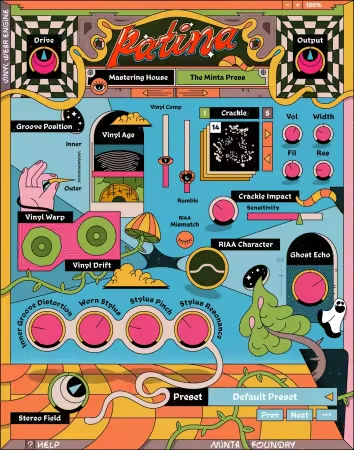
Patina是一款黑胶音频插件,可重现完整的模拟体验——从一张备受喜爱的唱片所具有的噼啪声和温暖感,到唱针、沟槽以及播放设备的细微瑕疵。
内部构造
精细建模每个细节
Patina重现了黑胶唱片播放的独特特性,从唱针的物理机械特性到模拟电路的温暖感。
噼啪声
25种表面噪声纹理,带有音量、宽度、滤波以及物理对音频影响的调节控制
黑胶老化
多年积累的磨损被建模为高频柔化、噪声底提升以及轻微压缩
黑胶变形
变形的唱片产生的缓慢音高波动——随着接近内圈沟槽,该效果逐渐加深
黑胶偏移
由偏心轴孔引起的一转一次的平滑音高偏移——微妙且持续变化
内圈失真
唱片标签附近因沟槽速度降低而产生的互调失真和高频损失
唱针共振
唱头自然共振峰值——高频提升,增添明亮感、空气感和临场感
磨损唱针
因数百小时播放而磨损的钻石唱针尖端带来的高频变钝、增添颗粒感以及噪声增加
唱针挤压
唱针在重低音内容下挤压沟槽壁产生的倍频失真
RIAA特性
黑胶模拟信号链的音色特点——增添温暖感、轻微饱和度和柔和的低音
RIAA不匹配
在温暖、浓郁饱满与明亮、有力且中频突出的播放均衡校正曲线之间切换
黑胶压缩
机械沟槽压缩——低音能量调制高音,产生微妙的起伏和高频衰减
幻影回声
相邻沟槽串音——响亮段落在周围相邻沟槽中留下微弱的幽灵般的痕迹
唱机隆隆声
电机和转盘轴承产生的低频振动——一种更多是能感受到而非听到的超低音存在感
立体声场
立体声宽度控制,范围从紧密的单声道兼容性收窄到宽广、开阔的立体声增强
母带处理厂牌
四种独特的母带处理链特性——每种都有其独特的刻纹机、磁带录音机以及声音特征
安装说明
1)安装Patina。
2)打开终端并输入以下命令
sudo xattr -r -d com.apple.quarantine
(末尾留一个空格),然后将Minta Foundry – License Manager(许可证管理器)拖到终端窗口中并按回车键。
输入您的密码,然后再次按回车键确认。
3)启动许可证管理器并点击“Start License Setup”(开始许可证设置)。
系统会多次要求您输入macOS密码,每次输入后都按回车键确认。
4)加载插件,点击“Offline Activation”(离线激活)并将.dt文件保存到桌面。
您的浏览器将打开——只需关闭它,然后点击Patina许可证管理器中的“Done”(完成)按钮。
5)输入您的电子邮件地址以获取许可证,然后点击“Select .dt file”(选择.dt文件)并从桌面加载生成的文件(patina_OfflineActivation.dt)。
关闭您的数字音频工作站(DAW)(或插件宿主)并重新加载插件。
尽情享受吧!
系统要求
macOS 10.15及以上版本
主页
https://www.mintafoundry.com/patina
Patina is a vinyl audio plugin that recreates the full analog experience — from the crackle and warmth of a well-loved record to the subtle imperfections of the stylus, the groove, and the machine that plays it all back.
Under the Hood
Every Detail, Modeled
Patina recreates the distinct characteristics of vinyl playback, from the physical mechanics of the stylus to the warmth of analog circuitry.
Crackle
25 surface noise textures with shaping controls for volume, width, filtering, and physical impact on the audio
Vinyl Age
Years of accumulated wear modeled as high-frequency softening, an increased noise floor, and gentle compression
Vinyl Warp
Slow pitch wobble from a warped disc — the effect deepens gradually as it approaches the inner grooves
Vinyl Drift
Smooth once-per-revolution pitch drift caused by an off-center spindle hole — subtle and always moving
Inner Groove Distortion
Intermodulation distortion and high-frequency loss from the reduced groove velocity near the record label
Stylus Resonance
The cartridge’s natural resonant peak — a high-frequency lift that adds brightness, air, and presence
Worn Stylus
Dulled highs, added grit, and increased noise from a diamond tip worn down by hundreds of hours of play
Stylus Pinch
Frequency-doubling distortion from the stylus shifting against the groove walls under heavy bass content
RIAA Character
Tonal coloration from vinyl’s analog signal chain — adding warmth, gentle saturation, and cushioned bass
RIAA Mismatch
Shifts the playback EQ correction curve between warm, lush and full or bright, punchy and mid-forward
Vinyl Compression
Mechanical groove compression — bass energy modulates the treble, creating subtle pumping and HF ducking
Ghost Echo
Adjacent groove bleed — loud passages imprint faint ghostly traces into the neighboring grooves around them
Turntable Rumble
Low-frequency vibration from the motor and platter bearings — a sub-bass presence felt more than heard
Stereo Field
Stereo width control ranging from tight mono-compatible narrowing to wide, spacious stereo enhancement
Mastering House
Four distinct mastering chain characters — each with its own lathes, tape machines, and sonic fingerprint
Installation Instructions
1) Install Patina.
2) Open the terminal and enter the following command
sudo xattr -r -d com.apple.quarantine
(leave a space at the end), then drag the Minta Foundry – License Manager into the terminal window and press Enter.
Enter your password and confirm again with Enter.
3) Start the License Manager and click on Start License Setup.
You will be asked several times for your macOS password, enter it each time and confirm with Enter.
4) Load the plugin, click on Offline Activation and save the .dt file to your desktop.
Your browser will open — simply close it and click the Done that button in the Patina License Manager.
5) Enter your email address for the license, then click Select .dt file and load the generated file from your desktop (patina_OfflineActivation.dt).
Close your DAW (or plugin host) and reload the plugin.
Have fun!
System Requirements
macOS 10.15+