GUISEPPE | 2026.2 | 38.5 MB
可定制的环绕声音频分析
针对 3D 和沉浸式音频的全面分析;Halo Vision 是一款可定制的实时可视化分析套件。丰富的模块让音频专业人士能够更清晰地理解其音频的方方面面,从而进行精准、自信的决策与故障排查,并精准定位仅靠人耳可能会遗漏的问题区域。
相关性视图
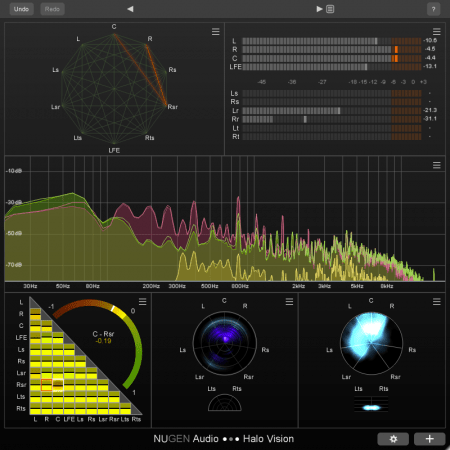
相关矩阵(Correlation Matrix)显示了各个声道之间按颜色编码的相位关系,配备一个更大的弧形电平表用于更细致的分析,并在达到用户定义的阈值时标记负相关(anti-correlation)。
相关网络(Correlation Web)展示了声道网络,每一对声道之间由互连线连接。当两个声道之间的相位关系变为负相关时,对应的线就会亮起。
这两个视图默认均使用上下文相关性(Contextual Correlation)。其他相关表所采用的标准计算方法经过归一化处理,可能会导致两个信号看似高度负相关,即便其中一个信号的响度远高于或低于另一个,以至于将它们混合在一起并不会引起相位抵消。上下文相关性对此类电平差异进行了补偿,仅突出显示可能会引发问题的相关度异常。
Haze(弥散/能量分布)视图
频率弥散(Frequency Haze)视图呈圆形,低频位于中心,高频位于外缘,显示了环绕声场中的频率内容,并按照典型扬声器位置标注了声道标签。
方位弥散(Location Haze)视图提供了音频感知方位的可视化效果,展示了环绕声场中的能量分布,其中越明亮的区域代表“能量”越高。
其他视图
在“Combined(组合)”模式下,频谱视图(Spectrum)在一个频谱图中显示所有声道的 FFT 电平-频率关系图。在“Groups(编组)”模式下,声道可以整理为多个频谱组。
真峰值视图(True Peak)为每个声道提供了真峰值 dB 电平表。
时间码视图(Timecode)显示基于当前宿主/DAW 播放位置的时间码读数。
轻松提升你的日常工作流效率
Halo Vision 是我们迄今为止最深入的市场研究成果,是我们通过对行业内众多值得信赖和尊敬的客户进行系列访谈,旨在精准发掘他们对于环绕声及沉浸式可视化音频分析的需求、诉求与期待的产物。
Halo Vision 的独特之处在于,它能够直观地展示各种复杂信息,而无需参考手册或面对屏幕上繁杂混乱的内容。我们基于市场上其他产品的功能、理念和灵感——以及我们自己备受推崇的其他插件(包括但不限于 Halo Upmix、Paragon 和 VisLM)——加以构建,从而打造出这套简洁、高效的分析套件。
典型应用场景
- 最高支持 7.1.4 声道的环绕声和沉浸式混音分析
- 检查相位相关性
- 实现空间信息可视化
- 确保混音作品能适配不同的声道布局
- 在不熟悉或声学处理不佳的房间里进行混音
系统要求
macOS 10.9 或更高版本
官网
https://nugenaudio.com/halovision/
Customizable surround audio analysis
Comprehensive analysis for 3D and immersive audio; Halo Vision is a customizable, real-time visual analysis suite. A variety of modules provide audio professionals with a clearer understanding of every aspect of their audio, allowing for precise and confident decision making and troubleshooting, and pinpointing problem areas which might be missed using ears alone.
Correlation views
The Correlation Matrix displays colour-coded phase relationships between every channel, with a larger arched meter for more detailed analysis, and anti-correlation alerts at a user-defined threshold.
The Correlation Web shows a network of channels with an interconnecting line between each pair. When the phase relationship between two channels becomes anti-correlated, the corresponding line lights up.
Both of these views use Contextual Correlation by default. Standard calculations used by other correlation meters are normalised in such a way that two signals might appear to be highly anti-correlated, even if one signal is so much louder or quieter than the other that mixing them together will not cause phase cancellation. Contextual Correlation compensates for these level differences, only highlighting correlation issues which are likely to cause a problem.
Haze views
With low frequencies at the centre and high frequencies on the outer edge, the circular Frequency Haze displays frequency content across the surround field, with channel labels in typical speaker positions.
The Location Haze provides a visualization of the perceived location of your audio, showing energy distribution across the surround field, with brighter sections indicating increased “energy”.
Other views
In ‘Combined’ mode, the Spectrum view displays an FFT level-against-frequency graph for all the channels in one spectrum. In ‘Groups’ mode, channels can be organised into groups of spectrums.
This True Peak view provides a True Peak dB level meter for each channel.
The Timecode view displays a timecode readout based on the current host/DAW playback position.
Effortlessly speed up your daily workflow
Halo Vision is the result of our most in-depth market research to date, the product of a series of interviews with many of our trusted and respected customers in the industry, with the aim of discovering exactly what they want, need and expect from surround and immersive visual audio analysis.
What makes Halo Vision unique is its ability to display a wide range of complex information intuitively, without the need for a crib sheet or tons of on-screen clutter. We have built upon features, ideas and inspiration from other products on the market – as well as other highly-regarded plug-ins of our own, including but not limited to Halo Upmix, Paragon and VisLM – in order to create a concise, streamlined analysis suite.
Typical applications
Surround and immersive mix analysis up to 7.1.4
Checking phase correlation
Visualising spatial information
Ensuring mixes translate to different channel layouts
Mixing in unfamiliar or badly treated rooms
System Requirements
macOS 10.9 or newer