File size: 76.77 MB
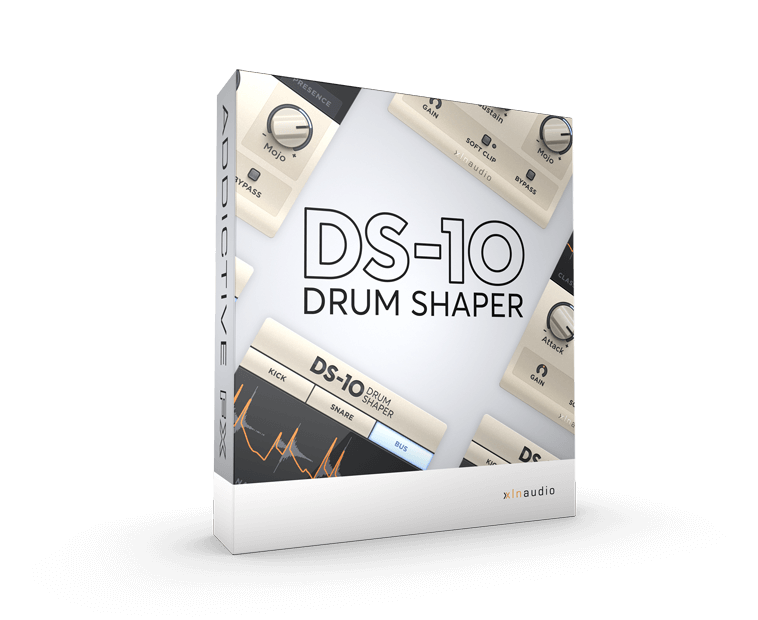
DS‑10 Drum Shaper,XLN Audio 出品鼓组专用瞬态塑形器插件,专门针对底鼓、军鼓、鼓 Loop 与鼓总线优化,界面简洁,旋钮即可快速塑造鼓组冲击力。内置 MOJO 处理器,可在选定频段内修改瞬态,其余频段不受干扰,拓展丰富声音设计玩法。
三种工作模式
‑ Kick(底鼓模式):针对独立底鼓轨道 / 采样,可调出肥厚宽大带房间感的底鼓,或是紧凑穿透力强的底鼓。 ‑ Snare(军鼓模式):优化独立军鼓,可做出共鸣开阔的炮轰质感,也可制作干燥锋利的军鼓。 ‑ Bus(总线模式):面向完整鼓组混音,用于鼓总线或者完整鼓 Loop 处理。
三种算法预设
‑ Classic:复刻老式瞬态塑形器尖锐原始音色,可做出抽吸 Pumping 效果,适合单轨采样。 ‑ Natural:处理大参数也不易产生伪影,音色自然,适合完整鼓组、复杂 Loop。 ‑ Smooth:超长释放时间,得到类似并行压缩般顺滑效果,适配复杂鼓素材。
核心控件
‑ Attack:提升 / 降低音头瞬态音量。 ‑ Sustain:提升 / 衰减音头之后的延音部分。 ‑ MOJO:频段感知瞬态塑形;收紧底鼓低频、增减军鼓中频厚度、调节鼓组高频存在感。 ‑ Gain 输出增益:补偿瞬态处理带来的音量变化,也可驱动 Soft Clip 获取更多音色毛刺。 ‑ Soft Clip 软削波:把输出限制在 0dB,同时加入轻微染色失真,小信号下也生效。 ‑ Bypass 旁路:插件内部旁路,切换不会产生宿主延迟补偿爆音。 ‑ 实时波形窗口:可视化观察瞬态被修改的变化。
系统要求
‑ Windows 10 / 11 64‑bit;macOS 10.13+,支持 Intel 与 Apple Silicon ‑ 插件格式:VST、AU、AAX 64 位 ‑ 安装过程需要网络连接;兼容主流 DAW:Logic Pro、Ableton Live、Pro Tools、FL Studio、Cubase、Reaper、Reason 等。
DS-10 is a transient shaper designed specifically for use with drums. The clutter-free interface lets you dial in just the right amount of punch in your drum mixes while three amazing algorithms provide great sounding results.
Our powerful MOJO processor lets you shape the transients in specially chosen frequency bands while leaving other bands unaffected, opening up a world of exciting sound design possibilities.
Awesome mixes. Fast.
Enhance your drums, beats, and loops with the twist of a knob. Get more smack in the attack. More gain in the sustain. Tight and punchy or huge and mighty: DS-10 improves your mixes in any direction. Fast.
Punch with precision.
Get custom treatment for your tracks and mixes. DS-10 Drum Shaper has three modes (Kick, Snare, and Bus) individually tuned and optimized to give you the best sound for the source you want to enhance.
Great, natural sound.
Say goodbye to grainy and unnatural sounding mixes. DS-10’s three different settings give you creative options and provide great sounding results, regardless of what style of mix you’re aiming for.
Add mojo to your mix.
The powerful MOJO knob adds flavor and color just where you need it. It lets you shape the attack and punch in curated frequency bands while leaving others unaffected, opening a world of sonic awesomeness and sound design possibilities.
→ Get to know DS-10 Drum Shaper
Kick mode
The KICK mode is optimized for processing an isolated kick drum track or sample. Make your kick sound huge, fat and roomy, or dial in the perfect tight and thumpy kick to punch through your mix.
Snare mode
The SNARE mode is optimized for processing an isolated snare drum track or sample. Bring out that huge, ringy shotgun sound, or dial in the perfect dry, punchy snare to cut through in your mix.
BUS mode
The BUS mode is optimized for processing an entire drum mix. Use it when you want to enhance your drum bus or a drum loop.
Waveform window
The Waveform window gives you visual feedback in real-time. See how and where you shape your transients for ultimate control.
Classic setting
The Classic setting gives you that sharp, raw sound known from classic legacy transient shapers. This algorithm provides the popular “pumping” effect in your tracks. Great for isolated tracks and samples.
Natural setting
The Natural setting provides natural, artifact-free mixes, even when pushing your sound into extreme territories. Sounds great on most sources, even complex sources like full kits and drum loops.
Smooth setting
The Smooth setting has an extra-long release time, giving you buttery smooth, parallel compression-like results. Sounds great on most sources, even complex sources like full kits and drum loops.
Attack
Increase or reduce the volume of the attack portion of the sound.
Sustain
Increase or reduce the volume of the sustain (post-attack) portion of the sound.
MOJO
MOJO lets you shape the attack and punch in curated frequency bands while leaving others unaffected. Control the low-end Tightness of a kick drum, add or remove midrange Body from a snare, or tune the high-frequency Presence of a drum mix.
Gain
Transient shaping can add a lot of volume to your signal. Use the Output Gain to counter this, so you can better compare processed and unprocessed with the Bypass button. You can also use Gain to drive the Soft Clip circuit for some extra “crack”!
Soft clip
This “speaker protection” circuit both clips the output level at “0” (unity gain) and adds mild coloration/distortion – even on lower signals.
Bypass
Great for on/off testing. Bypass is also available in your host, but using that may cause audible glitches due to latency compensation kicking in and out. DS-10’s Bypass syncs both on and off.
Release Notes
Supported Operation System
• macOS 10.13 or later
• Apple Silicon or Intel Core processor