MORiA | AU | VST3 | 8.9 MB
传统门限效果器会根据整体音量作用于全部信号,而频谱门会捕捉频谱的每一个细微频段,并独立判定各频段信号的通断。
・分离音频瞬态信号
・清除噪音或混响尾音
・以富有音乐性或更具冲击力的方式塑造音色质感
阈值曲线功能支持你创建自定义阈值曲线,可自由添加任意数量的调节点。你能拖动单个调节点调整曲线形态,也可直接上下拖动整条阈值曲线,实现快速参数调节。
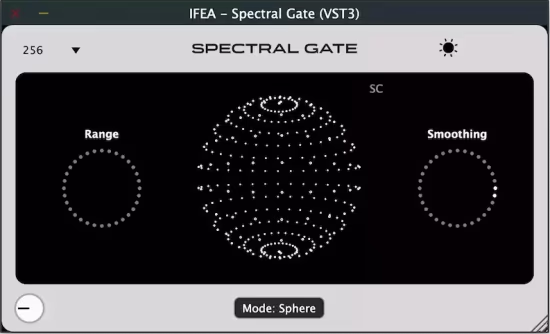
范围
・低范围数值 = 门限处理更严苛,更多频段被剔除
・高范围数值 = 更多被压制的基础信号被回混,营造更顺滑的音色质感
平滑度
・低平滑度数值 = 门限过渡更锐利,效果边界更清晰
・高平滑度数值 = 门限过渡更丝滑细腻,避免出现爆音,打造更具音乐性的朦胧效果
macOS 10.13 或更高版本
IFEA – Spectral Gate Frequency-Selective Gating.
The Threshold controls which frequencies pass through and which ones get muted or reduced, but instead of applying it to the whole signal, it works per frequency bin thanks to FFT. When the energy of a frequency band is above the threshold, it’s allowed to pass. When it’s below the threshold, it gets gated, meaning reduced or silenced. This gives you precise, frequency-dependent control over what stays and what goes.
Why it is special?
Unlike traditional gates that affect the full signal based on overall volume, the Spectral Gate listens to every tiny slice of the spectrum and decides what to let through.
That means you can
• Isolate transients
• Clean up noise or reverb tails
• Shape textures in a musical or aggressive way
Dial it low for a gritty, textured effect.
Dial it high to let only the strongest parts of the sound cut through.
What is Threshold Curve?
Threshold Curve lets you add a custom threshold curve with as many points as you want. You can drag individual points to shape the curve, or even drag the whole threshold up or down for quick adjustments.
Need more precision? Go full screen for a detailed view and fine-tune your curve with maximum control.
What are Range and Smoothing?
Range
Sets how much of the gated frequencies are blended back into the signal
• Low range = tighter gating, more frequencies removed
• High range = more of the floor/suppressed content mixed back in, creating smoother textures
Smoothing
Sets how gradually the gate transitions when frequencies cross the threshold
• Low smoothing = sharper, more defined gating
• High smoothing = glassy, polished transitions that avoid clicks and create more musical, washed-out effects
System Requirements
macOS 10.13 or newer