File Size: 17.5 MB
Vovsoft Merge Audio Files,Windows 平台音频合并工具,用于将多段音频拼接合并输出单个连续音频文件,适合歌曲、有声书章节、播客、录音素材合集快速拼接,无需复杂专业音频编辑软件。
支持格式
MP3、WAV、M4A、WMA、FLAC、OGG、OPUS、AAC、AIFF、AC3、EAC3、MP2、WV。
核心功能
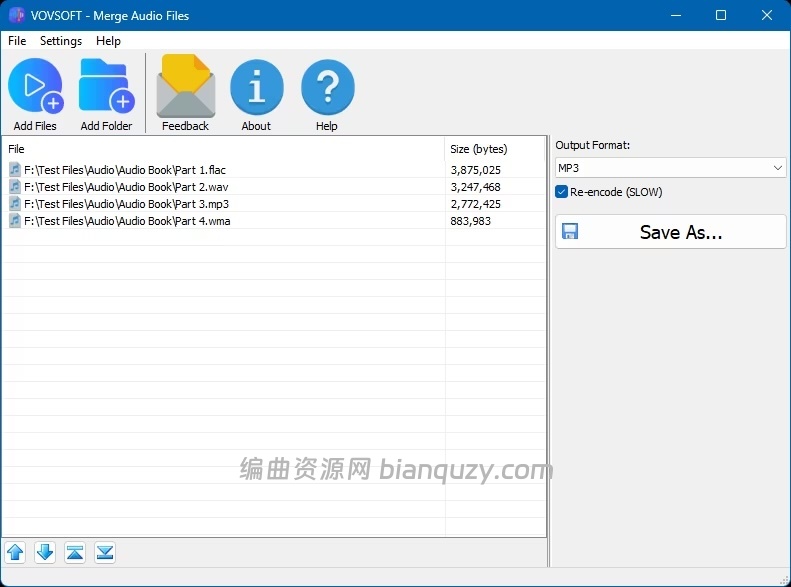
‑ 支持添加单个文件或者整个文件夹,支持 Windows 资源管理器拖拽导入音频 ‑ 拖拽调整音频片段顺序,自定义最终输出的播放序列 ‑ 不同格式、参数的音频可以混合拼接;跨格式合并时开启Re‑encode 重新编码,提升输出兼容性 ‑ 合并同时可转换输出为其它音频格式 ‑ 轻量程序,界面简洁,操作简单
说明:输入音频参数完全一致时,合并速度最快;混合异构音频建议开启重编码。
系统要求
Windows 11 / Windows 10 / Windows 8‑8.1 / Windows 7 / Windows Vista(32‑bit & 64‑bit) 提供安装版 (Installer) 与便携版 (Portable) 两种程序包;软件为试用付费模式,付费授权享有终身更新。
Vovsoft Merge Audio Files is a simple and efficient Windows application that helps you merge multiple audio tracks into a single file. Whether you want to combine songs, audiobook chapters, podcasts, recordings, or music collections, the program provides a straightforward way to create one continuous audio file.
The software supports a wide range of popular audio formats, including MP3, WAV, M4A, WMA, FLAC, OGG, OPUS, AAC, AIFF, AC3, EAC3, MP2, and WV. Simply add files or entire folders, arrange them in the desired order, choose an output format, and save the merged result.
This lightweight utility can combine audio files from different formats into one file. It can also join audio files without requiring complicated audio editing software. For users looking for a fast and easy audio file merger, the application offers a clean interface and a hassle-free workflow.
Files can be added using the Add Files and Add Folder buttons or by simply dragging and dropping files from Windows Explorer into the file list. The file order can also be easily changed with drag-and-drop, allowing you to arrange tracks exactly as they should appear in the final merged file.
When all input files use the same format and audio settings, merging can be performed quickly. However, when combining different formats (for example, MP3, FLAC, WAV, and WMA files together), enabling the Re-encode option is recommended to ensure maximum compatibility and a smooth output file.
System Requirements: Windows 11, Windows 10, Windows 8/8.1, Windows 7, Windows Vista (32-bit & 64-bit)