常见问题解答
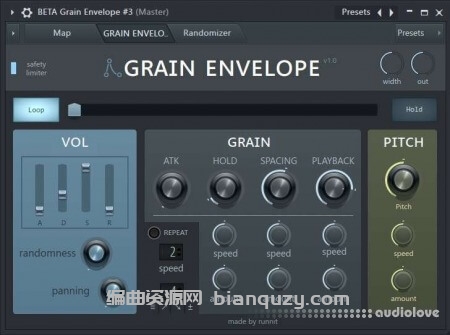
This patch adds envelopes, randomization, and note-retriggering to fruity granulizer. its great for making all sorts of sounds like granular basses, experimental scapes, mangled melodies, vocal fx, etc.
FAQ:
1- To load a sample: open Map section and drop a sample into the Granulizer labeled “LOAD SAMPLE HERE”
2- Tweak the top sliders and knobs of each section as you normally would inside granulizer. (ie, the volume envelope, attack, hold, grain spacing, playback, and pitch knobs)
3- bottom knobs let you automate the grain and pitch sections for interesting effects
4- the Repeat toggle retriggers notes at multiples of a quarter note up to 20 slices for crazy glitches… it also acts as an arpeggiator! use the bottom digits option to choose between
1 trigger notes in order as played, 2 up the scale, 3 down the scale, or 4 randomized
grains button randomizes the grain section and the pitch. start pos button only changes the top slider for starting position. helpful in case you found a good starting point and don’t want to lose it.