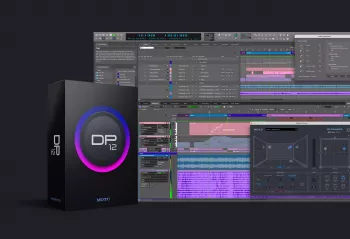
Team R2R | 18 Sep 2026 | 2.06GB
Digital Performer 12(DP12),MOTU 出品专业数字音频工作站,适用于录音室制作、词曲创作、影视配乐、现场演出、Remix、后期制作以及环绕声混音,面向高标准专业录音制作环境。
核心新增功能
- Dolby Atmos 杜比全景声沉浸式混音 内置完整 Atmos 渲染器;支持最多 128 个对象音频通道,可在三维声场自由定位声源;支持 9.1.6 扬声器监听,也可通过普通耳机进行双耳 Binaural 监听;可导出行业标准 ADM 文件,适配 Apple Music、Tidal 等空间音频流媒体平台,支持 Bed 基底音轨、对象音频、声像元数据的录制与回放。
- AI‑Powered Stem Separation AI 音轨分离 MOTU 自研 AI 引擎,可直接将完整混音一次性拆分为鼓、贝斯、吉他、人声、合奏弦乐、合奏铜管分轨。支持仅输出选定分轨,或输出移除目标声部后的伴奏版本,可用于 Remix、二次改编、乐器练习。
- Arrangement Strip 编曲条 对工程划分 Intro、Verse、Chorus、Bridge 等段落块;拖动色块即可整体重新排布全工程所有轨道内容,支持复制、移动、重排序、裁切、删除段落,快速尝试多种歌曲结构。
- 增强型轨道冻结 Enhanced Track Freeze 一键直接冻结轨道,不会额外生成新轨道;冻结状态下仍可继续混音调节;可执行 Flatten 将轨道永久固化;编辑被冻结轨道会自动解除冻结。
- Main MIDI Controller 主 MIDI 控制器菜单 可指定一个或多个外接 MIDI 设备作为主要输入源,统一管理 MIDI 录入,过滤无关设备的多余 MIDI 信号。
- MusicXML 导入 / 导出 完整双向兼容 MusicXML 格式,可与 Dorico、Sibelius、MuseScore 等第三方打谱软件来回交换乐谱工程,支持力度、演奏法、小节反复、文本标记等信息。
工作流与交互提升
‑ Hover Effects 悬浮动效:UI 交互增加悬浮动画反馈,可在偏好设置关闭。 ‑ 增强拖拽导入:外部音频 / MIDI 文件拖入工程时,可精准定位到现有轨道、轨道间隙(自动新建轨道)或时间轴指定位置;支持将序列块拖拽至另一个工程时间线,可合并同名轨道。 ‑ 标签与多维度搜索系统:轨道 / 片段可自定义标签;搜索支持名称、标签、注释组合检索;偏好设置面板、快捷键窗口均可关键词检索;快捷键集 Keysets 可保存多套快捷键方案,一键切换适配剪辑、视频对位、录音等不同工作场景。 ‑ Track Presets 轨道预设:保存 IO 端口、EQ、插件链路等全套轨道设置;软件自带人声、鼓、贝斯、吉他等数十套预设,也可自制,浏览器直接拖拽套用。 ‑ 淡入淡出自定义预设:保存调用自定义 Fade/Crossfade 淡变预设。 ‑ 强化 AAF/OMF 工程交换:兼容新版 AAF/OMF 标准,提升工程导入容错恢复能力。 ‑ 大计数器窗口 Large Counter:窗口与内部文字均可独立缩放。 ‑ 高帧率 HFR 视频支持:支持 47.952、48、50、59.94、60、100、119.88、120fps 等高帧率,适配影视后期。 ‑ VST3 自动迁移:插件版本升级时保留参数与自动化,例如 Kontakt。
内置素材与辅助工具
‑ Performer Producer Pack:数百条音频 Loop、MIDI 和弦、MIDI 琶音素材,浏览器直接拖拽使用。 ‑ 交互式教程 Tutorials Window:分段式学习教程,快速上手 DP。 ‑ Flyover Help 悬浮提示:鼠标悬浮 UI 控件,弹出简短功能说明。
Empower and inspire your audio production workflow
For studio production, song writing, film scoring, live performance, remixing, post production and surround mixing, Digital Performer inspires your creativity and streamlines your workflow with state-of-the-art studio production technologies engineered for the most demanding, world-class recording and production environments.
DP version 12 delivers exciting new features like immersive mixing in Dolby Atmos®, AI-powered stem separation, the new Arrangement Strip, plus dozens of workflow enhancements.
Dolby Atmos support — Mix in Dolby Atmos® multichannel formats, with additional support for playback and recording of beds, object audio, and panning meta data. Monitor your spatial mix on speakers up to 9.1.6 or listen binaurally on any standard headphones. Deploy your mix to industry standard immersive sound formats and platforms such as Apple Music™ and Tidal™ using Digital Performer’s internal Dolby Atmos renderer.
AI-powered Stem Separation — Extract individual instruments and vocals from a full mix in one operation, including drums, bass, guitar, vocals, ensemble strings and ensemble brass. Additional options produce selected stems, a mix with the selected stem(s) removed, or both.
Arrangement Strip — Create sections to organize and arrange (or re-arrange) your music. Drag sections in the timeline to re-arrange them, along with all track data below each section. Duplicate, move, re-order, snip and delete sections with ease.
Enhanced Track Freeze — Freezes tracks directly with one click, without adding a new separate track for frozen audio. Continue to mix tracks while they’re frozen. Flatten frozen tracks to freeze them permanently.
Main MIDI Controller menu — Choose an external MIDI controller, or multiple MIDI controllers, as your primary MIDI input device(s) to manage MIDI input and filter out unwanted MIDI from connected devices.
Hover Effects — DP12 feels more reactive and dynamic, with hover effects and animations when navigating around the interface.
MusicXML Import — Digital Performer can now import MusicXML files, as well as export them. This allows for complete, round-trip interchange with 3rd-party music notation software applications, such as Dorico™, Sibelius™ and MuseScore™.
Enhanced Drag-and-Drop File Import — When dropping external audio files or standard MIDI files (SMFs) into the timeline of the Track Overview or Sequence Editor, you can target an existing track, or the space between tracks, which creates a new track (or multiple tracks) between them. You can also target a specific location in the timeline, as indicated by an outlined box as you drag.
Tags and Search Enhancements — Tags serve as searchable keywords for tracks and chunks. Create as many tags as you wish and assign them as desired to tracks and chunks. You can then use tags for track and chunk searching and sorting.
Enhanced Searching — The Search boxes in the Track List and Chunks List now feature a menu allowing you to search for names, tags, comment text, or any combination of the three.
Preference Window Search — Quickly find and modify settings and options. Type any keyword to immediately filter the current view.
Search for Commands by Key Binding — In the Commands window, you can now search for commands by key binding. This makes it easy to find which command is assigned to a particular key binding.
Commands window Keysets — Keysets let you quickly switch among different key binding sets as you work, depending on the specific task at hand, such as editing or spotting to picture versus tracking in the studio. Set up custom keysets for each task and then quickly switch between them.
Track Presets — A track preset can include any track settings, from I/O and EQ settings to plug-in chains. Drag & drop presets from the Content Browser to apply them to existing tracks or create new tracks from them. DP12 provides dozens of presets to get you started with vocals, drums, bass, guitar and many other instruments. Or create and recall your own presets.
Custom presets for fades and crossfades — Save and recall custom presets for fades and crossfades. Drag and drop fade presets from the Content Browser.
Enhanced AAF/OMF support — Improved compatibility with newer projects generated under the most recent standard.
Large Counter window enhancements — Resize the Large Counter window both vertically and horizontally. Resize counter text independently from the window size.
Updated surround formats — DP12 now supports all current industry standard surround formats, including 7.1.2 and 9.1.6.
Support for High Frame Rates (HFR) — Digital Performer now supports high frame rates above 30 fps, including 47.952, 48, 50, 59.94, 60, 100, 119.88 and 120 fps.
Tutorials Window — Provides an interactive experience for learning Digital Performer quickly.
Flyover Help Window — Provides a brief description of user interface elements when you hover the cursor over them.
Support for VST3 auto-migration — Enables compatible plugins (such as Native Instruments Kontakt) to seamlessly upgrade or change versions while preserving settings and automation.
Performer Producer Pack — Delivers hundreds of audio loops, MIDI chords and MIDI arpeggios.