 File size: 16 MB
Vovsoft Text to MP3 Converter,文本转语音桌面软件,依托系统自带微软 SAPI TTS 语音引擎生成人声,适合网课、演示文稿、YouTube 视频制作以及内容无障碍朗读。
核心功能
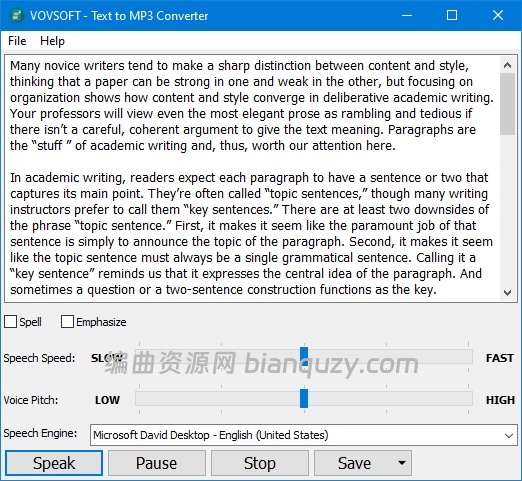
- 文本朗读,支持选择不同 SAPI 语音引擎
- 语速调节:最慢 0.1 倍至最快 10 倍
- 音调 Pitch 高低调节
- 拼写检查、文字着重强调功能
- 导出格式:MP3(体积小)、WAV(音质更高)
- 实时朗读预览文本内容
简要说明
软件本身不自带语音模型,调用 Windows 预装的 SAPI 文字转语音引擎;操作简单,无需复杂配置,适合轻量文本转音频需求。
Easily convert your text into speech. Perfect for e-learning, presentations, YouTube videos and increasing the accessibility. The text can be exported as MP3 and WAV files. This program uses the preinstalled Microsoft SAPI Text-to-Speech (TTS) engines for generating voice.
Text to MP3 software
If you need to simply convert some text into audio content or you’re just looking for a way to preview some content without having to actually spend time reading it, Text to MP3 Converter can do both, offering you choices for the used speech engine, as well as the output audio format. The two main options offer users the choice of increased quality (WAV) or a more compact recording (MP3). “Speech Speed” option allows from 10x slow to 10x fast playing and recording. If you seek a basic application that can help you perform text to audio conversions, without having to resort to complex steps and configuration processes, try out this simple yet quite capable software.
Key Features
Checkmark Speech speed (fast-slow)
Checkmark Voice pitch (high-low)
Checkmark Spell
Checkmark Emphasize
Checkmark Multiple speech engine support
Checkmark Read aloud
Checkmark MP3 export
Checkmark WAV export
vovsoft.com