File size: 61.1 MB
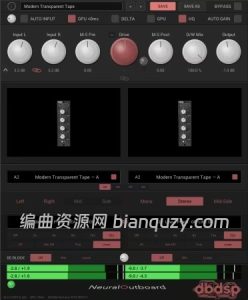
NeuralOutboard 借助神经网络捕获技术,把真实模拟外部硬件设备的声音特质完整带入你的 DAW 宿主软件。 插件运行 NAM 神经网络模型,可以将真实硬件带来的饱和失真、丰富谐波与独特音色染色,印刻到任意音频素材上:人声、鼓组、贝斯、合成器,甚至整段混音母带。
支持将 NAM(Neural Amp Modeler)捕获模型载入两个独立模型插槽;你可以随意驱动推大失真量,配合完整立体声、中侧 M‑Side、过采样功能去塑造声音。无论是微妙的混音粘合效果,还是浓烈粗犷的模拟硬件颗粒感,都可以做到声音干净、精准且富有音乐性。
核心功能
🚀 GPU 硬件加速
神经网络运算交由显卡 GPU 处理,一键开启无需复杂设置。可以实现 CPU 很难跑起来的高倍率过采样。例如 32 倍过采样,CPU 几乎无法运行实例,而 MacBook Pro M3 Max 可同时跑 6 个实例。
- macOS:Metal 图形接口
- Windows:Direct3D 12
⚡零延迟 GPU 模式
专门用于录音、监听的第二种 GPU 模式,完全无处理延迟;可运行实例数量会比标准 GPU 模式更少,但无需做任何延迟补偿。
🧠神经网络捕获引擎
两个独立插槽加载 .nam 格式捕获文件;同时兼容全新 A2 架构 以及旧版 A1 老模型,复现各类模拟硬件的饱和与谐波特性。
🎛️ NAM Sets & Morph 模型平滑变形
单个预设可保存一整套多组捕获模型,例如同一台硬件在不同驱动电平下的多组采样。依靠一枚 Morph 旋钮就可以在多组模型之间顺滑过渡,旋钮参数支持自动化。
📦10 套原厂捕获模型包
插件附赠 10 套精心挑选的真实硬件捕获包,拥有独立安装器;按需勾选安装,模型会自动出现在插件预设菜单。
Drive & D/W Mix 驱动与干湿比
Drive 旋钮推高输入,获取更丰富谐波;D/W Mix 干湿混合旋钮实现并行饱和处理,自由平衡干声与染色后的信号。
Stereo & Mid‑Side 立体声 / 中侧处理
支持左声道、右声道、中间 Mid、侧边 Side、单声道、立体声多种处理模式,拥有独立的 M‑Side 处理前、处理后平衡控制。
🔬过采样 Oversampling
最高 32× 过采样,消除数字混叠失真;实时播放与离线渲染可以设置不同倍率,提供 IIR、Min‑FIR、Poly、Linear 多种滤波器。3.2 版本重写过采样引擎,运算速度提升约 3 倍,也是 GPU 可以多开实例的关键。
✅全设置相位对齐
插件会针对每个模型测算延迟并上报给 DAW;插件内部会对齐干声通路,无论过采样倍率、滤波器如何切换,D/W Mix 干湿混合始终保持相位正确,宿主自动完成剩余延迟补偿。
精细控制模块
直流偏移过滤(DC‑block)、Delta 差分监听、Auto Input 自动输入、Auto Gain 自动增益、立体声联动输入、输出 Trim 电平修整。
预设与电平表
可保存 / 调取自定义预设,信号链路全程提供输入、输出电平监测。
MAX banks 极限捕获组
由电子管、变压器、磁带推至极限饱和状态录制得到的捕获模型。向下转动 Drive 旋钮,就可以完整遍历硬件从重度失真到干净线性的全部饱和阶段。
支持格式
VST3、AU(macOS)、AAX(Pro Tools)
系统需求
Windows 10 / Windows 11;macOS(Intel 与 Apple Silicon)
- 一次性买断永久授权,售价 49 美元,提供 14 天完整功能试用。
主页地址: https://dbdspaudio.com
NeuralOutboard – the character of analog outboard gear, neurally captured and fully in your DAW.
NeuralOutboard runs neural captures of analog hardware so you can print real saturation, harmonics, and color onto any source: vocals, drums, bass, synths, or a full mix.
Load NAM (Neural Amp Modeler) captures into two independent capture slots, drive them as hard as you like, and shape the result with full stereo, Mid-Side, and oversampling control. From subtle mix glue to overt analog grit, it stays clean, precise, and musical.
GPU acceleration
Run the neural model on your graphics card instead of your CPU. One button, no setup. It makes oversampling factors practical that a CPU cannot manage at all: at 32×, where CPU-only fits no instances, a MacBook Pro M3 Max runs six. Metal on macOS, Direct3D 12 on Windows.
Zero-latency GPU mode
A second mode adds no latency at all, for tracking and monitoring through the plugin. Fewer instances than the standard GPU mode, but nothing to compensate for.
Neural capture engine
Load NAM (.nam) captures into two independent slots, with full support for the new A2 architecture as well as legacy A1 models, and reproduce the saturation and harmonic character of analog gear.
NAM Sets & Morph
A single preset can hold a whole series of captures, one unit taken at several drive settings for instance, swept smoothly with one Morph knob and fully automatable.
Ten free factory packs
Curated capture packs of real hardware are included free with the plugin. They arrive as their own installers, so you tick the ones you want, and they appear in the preset menu on their own.
Drive & D/W Mix
Push into the model for richer harmonics, then blend processed and dry signal for parallel saturation.
Stereo & Mid-Side
Process in Left, Right, Mid, Side, Mono, Stereo, or Mid-Side, with dedicated M-S pre and post balance.
Oversampling
Up to 32×, removing all digital aliasing, with independent real-time and offline render settings and IIR, Min-FIR, Poly, or Linear filters. The oversampling engine was rebuilt in 3.2 and runs roughly three times faster, which is what lets the GPU reach the instance counts above.
Aligned at every setting
Latency is measured per model and reported to your DAW, and the dry path is aligned inside the plugin, so D/W Mix stays phase-correct at any oversampling factor or filter, and your host compensates the rest automatically.
Precision controls
DC-block filtering, Delta monitoring, Auto Input and Auto Gain, stereo-linked input, and output trim.
Presets & metering
Save and recall your own presets, with full input and output metering throughout the chain.
MAX banks
Captures taken with a tube, transformer or tape pushed to its ceiling, so rolling the Drive back walks you down through every stage of saturation, from fully driven to clean.
System Requirements: Windows 10, 11