FANTASTiC | 19 November 2025 | 0.6 MB
曲线编辑器(THE CURVE EDITOR)
熟悉的控制旋钮(FAMILIAR CONTROLS)
安装方法(HOW TO INSTALL):
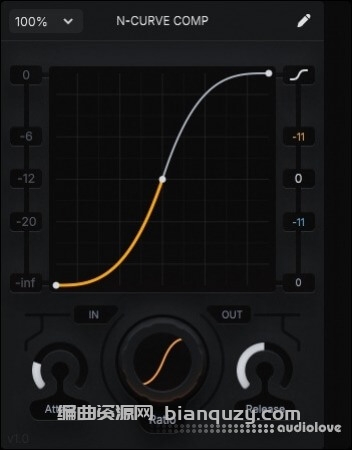
N-CURVE COMP is a curvature compressor that is capable of complex dynamics reshaping while being streamlined and efficient.
This plugdata patch uses waveshaping on the analysis signal to compress the original signal towards the waveshaped version!
This means that at 0 attack and release, you’re close to full-on waveshaping!
The upward compression limit is 96dB, which can be extended to 120dB if the input gain is raised to max 24dB! ✨
N-CURVE COMP comes with a built-in ~1ms lookahead to reduce distortion, allowing for incredibly transparent limiting behavior (0ms atk) while still allowing for crunch when needed
THE CURVE EDITOR
To get you started understanding curvature compression, you can use the curve preset menu to get familiar with the different forms of compression in N-CURVE COMP
You can edit the curve by click dragging points, double clicking to add or remove points and click dragging the curves to adjust curvature between points.
Holding Shift while dragging a point enables snapping to grid.
Ctrl + clicking a curve resets the curvature
A linear curve means a signals comes in and goes out without change. The range of N-CURVE COMP is -infdB to 0dB by default, which means any signals above 0dB will be compressed to 0dB.
Adjust the ceiling offset to the right of the curve editor.
Adjust input and output gain below the curve editor.
FAMILIAR CONTROLS
Attack and Release work similar to other compressors, except that N-CURVE does not add attack to upward compression, as it’s unstable and causes very loud transients This ensures N-CURVE COMP sounds transparent at any setting!
Lastly, you can adjust the overall ratio of the curve editor, giving you even more control over how much the dynamics reshaping is applied
ENJOY!
HOW TO INSTALL:
INSTALL/UPDATE TO PLUGDATA 0.9.2
DRAG AND DROP THE .PLUGDATA FILE INTO PLUGDATA