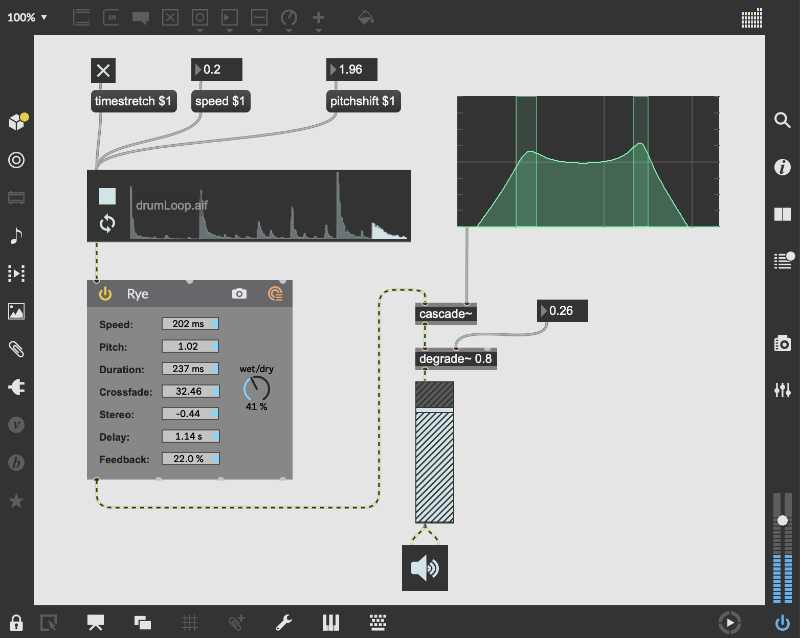
模块(OBJECTS)
连接线路(PATCHCORDS)
控制功能(CONTROL)
即时创建专属软件
拓展创意边界
无界探索声音
以动作触发声音
创作视觉音乐
让 Max 融入现实世界
原型开发与效果评估
生成音频、视频与代码
拓展 Max 功能
Max is an infinitely flexible space to create your own interactive software. Connect Ideas Together to Create!
OBJECTS
Each object does something. Max has objects that generate sound waves, represent hardware, or provide a UI for interaction.
PATCHCORDS
Patchcords connect one object to another. This connection lets objects share their output with connected objects.
CONTROL
Connect UI objects like dials and sliders to provide control values or display results. Modulate, map and scale data to get just the right results.
Create Software Built Around You, In the Moment
- Drag in your own audio clips and start manipulating them and connecting effects
- Map your patcher with MIDI controllers as you go to start playing with your creation while you work
Expanded Ideas
Max patching starts on a blank canvas, free of any structure. This makes it natural to build and explore unique ideas that would be too complex to make elsewhere. The Max patcher automatically expands to fit your work as it grows, no matter how much space you take up.
Explore Sound without Limits
- Design a custom synthesizer with as many oscillators and effects as you wish.
- Manipulate samples in every way, including timestretch and pitch shifting.
- Build up more layered sounds using MC objects to patch multichannel audio.
Make Sound with a Gesture
In Max, you can build classic synths from scratch or get lost hacking together unusual sounds. Try the XY controls below to hear some sounds you could create with Max.
- You can do a lot with just a single oscillator and a filter.
- Add some extra modulation and try something a little more wild.
Make Visual Music
Max includes full-featured, expandable video and graphics tools with Jitter. Jitter is optimized for realtime audiovisual work, and is easy to combine with audio, sequencing, and modulation like everything else in Max.
Take Max into the World
Max provides the tools to connect your computer to the external world, or connect many computers together. With support for a constantly expanding list of hardware and communications, Max is ready to talk to everything.
Prototype and Evaluate
Flexible access to hardware makes Max a perfect environment for prototyping. Connect your development board to Max and get instant access to sensors, knobs, and switches. Watch the data stream in as you develop the interaction.
Countless commercial products, art installations, and stage shows have relied on Max to glue together all the parts of their process.
Generate Audio, Video, Code
Use Gen to patch together fine-tuned processes for audio, matrix data, or texture processing. Gen lets you combine procedural commands with visual patching to simplify the creation of custom processes.
Gen objects can also output source code to be used elsewhere if needed.
Extended Max
Max’s built-in Package Manager offers immediate access to over 50 add-ons covering everything from computer vision to support for hardware controllers including Novation, Monome and ROLI controllers.
If the feature you want doesn’t exist in Max, chances are someone in the community has created it. And if they haven’t, you can extend Max yourself using C++, NodeJS, Java, or javascript.