EDiSO | 30 January 2026 | 1 GB
终极现场演出系统(The Ultimate Live Rig)
- 借助 100 余款乐器、效果器、MIDI 插件,或你钟爱的 Audio Units 插件进行现场演出
- 导入 Logic Pro 中的任意预设音色(Patch),将工作室级音质带到舞台
- 在单个预设音色中整合乐器与现场音频(如键盘和人声)
- 切换预设音色时无需中断声音输出,也不会切断持续发声的音符
- 通过拆分(splits)和分层(layers)功能,设计丰富的键盘预设音色
- 利用播放功能(Playback),搭配立体声或多轨伴奏曲目演出
硬件控制(Hardware Control)
- 连接心仪的 MIDI 硬件,用于演奏和控制插件
- 支持搭载 USB 和 MIDI 功能的控制器,如键盘、脚踏开关和鼓垫
- 快速将硬件旋钮、按钮和推子分配给屏幕控件
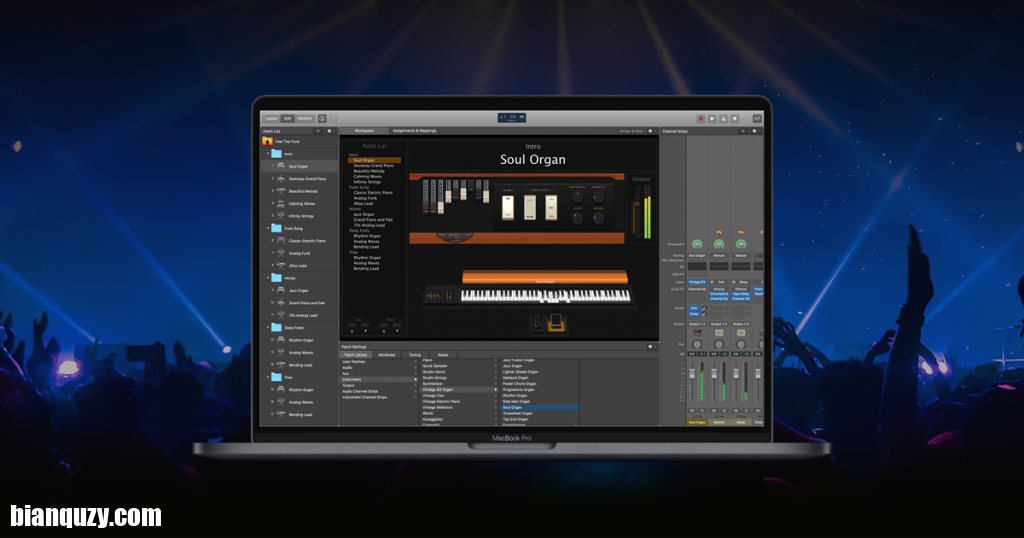
- 通过 “分配与映射概览”(Assignments & Mapping overview),管理复杂的演出设备组合
为舞台量身打造(Designed for the Stage)
- 自定义全屏现场界面,演出时仅显示所需内容
- 屏幕控件通过智能控制(Smart Controls),适配每个预设音色
- 智能控制提供动态演出控件,随每个预设音色同步变化
- 高对比度全屏演出视图,让你在远处也能清晰查看 Mac 屏幕
乐器插件(Instrument Plug-ins)
- 借助采样器(Sampler)和快速采样器(Quick Sampler),演奏或创作各类丰富的采样乐器
- 使用自动采样器(Auto Sampler)插件,将你喜爱的硬件合成器转化为采样乐器
- 利用终极采样操控合成器 Alchemy,快速查找音色或创作独特新音色
- 通过复古合成器(Retro Synth),演奏经典的 70 年代和 80 年代风格合成器音色
- 多款合成器任你选择,涵盖模拟、波表、调频(FM)、加法、颗粒、频谱及建模合成技术,演绎富有灵感的音色
MIDI 插件(MIDI Plug-ins)
- 利用 9 款 MIDI 插件,将简单创意转化为复杂演出效果
- 借助琶音器(Arpeggiator),瞬间将简单和弦转化为丰富的演奏段落
- 使用和弦触发器(Chord Trigger),弹奏单个音符即可触发预设和弦
- 演奏一段旋律后,通过移调器(Transposer)将音符适配至特定音阶
创意与制作效果器(Creative and Production Effects)
- 让声音通过各类逼真的声学空间效果器,或创意合成混响效果器播放
- 提供多抽头、复古磁带及立体声延迟等多种延迟效果器
- 借助各类调制效果器,为音轨增添动态变化
- 多款复古与现代风格的均衡器(EQ)、动态效果器及其他混音工具,助你打造完美混音
支持 Ableton Link
音色库(Sound Library)
- 全新音色库收录不断扩充的优质音色包,供你探索
- 聆听任意音色包的音频预览,安装心仪的音色包
- 观看制作人专属音色包视频,从顶尖制作人的创作过程中获取灵感,随后安装他们定制的循环素材和乐器
- 轻松删除不再使用的音色包,释放存储空间
兼容性
MainStage lets you take your Mac to the stage with a full-screen interface optimized for live performance, flexible hardware control, and a massive collection of plug-ins and sounds that are fully compatible with Logic Pro.
The Ultimate Live Rig
•Perform live with over 100 instrument, effect, and MIDI plug-ins or your favorite Audio Units plug-ins
•Add any patches from Logic Pro to bring your studio sound to the stage
•Combine instruments and live audio, such as keyboards and vocals, in a single Patch
•Switch between Patches without stopping sound output or cutting off held notes
•Design rich keyboard Patches using splits and layers
•Perform with stereo or multitrack backing tracks using Playback
Hardware Control
•Connect your favorite MIDI hardware and use it to play and control your plug-ins
•Use USB and MIDI-equipped controllers like keyboards, foot pedals, and drum pads
•Quickly assign hardware knobs, buttons, and faders to onscreen controls
•Manage sophisticated rigs using the Assignments & Mapping overview
Designed for the Stage
•See only what you need during your performance using a customizable, full-screen live interface
•Screen controls adapt for each Patch using Smart Controls
•Smart Controls offer dynamic performance controls that change with each Patch
•Easily view your Mac screen from a distance using a high-contrast, full-screen performance view
Instrument Plug-ins
•Play or create a wide variety of rich sampled instruments with Sampler and Quick Sampler
•Turn your favorite hardware synthesizers into sampled instruments using the Auto Sampler plug-in
•Quickly find sounds or create unique new ones with Alchemy, the ultimate sample manipulation synthesizer
•Play classic ’70s- and ’80s-style synthesizer sounds using Retro Synth
•Perform inspired sounds using a collection of synths that provide analog, wavetable, FM, additive, granular, spectral, and modeling synthesis
MIDI Plug-ins
•Transform simple ideas into elaborate performances using nine MIDI plug-ins
•Instantly turn a simple chord into a rich performance with the Arpeggiator
•Play a single note to trigger predefined chords with Chord Trigger
•Perform a part and conform notes to a specific scale using Transposer
Creative and Production Effects
•Play your sounds through a variety of realistic acoustic spaces or creative synthesized reverbs
•Use a range of multi-tap, vintage tape, and stereo delays
•Add movement to your tracks with a variety of modulation effects
•Get the perfect mix with a collection of vintage and modern EQs, dynamics, and other mixing tools
Support for Ableton Link
Synchronize tempo with Ableton Link supported software and hardware devices
Sound Library
•Explore an ever-expanding collection of premium sound packs with the brand new Sound Library
•Listen to audio previews of any sound packs and install your favorites
•Watch producer pack videos to get inspired by the creative process of top producers, and then install their custom made loops and instruments
•Free up storage space by easily deleting packs you are no longer using
Compatibility: macOS 15.6 or later