P2P | 16 November 2025 | 399 MB
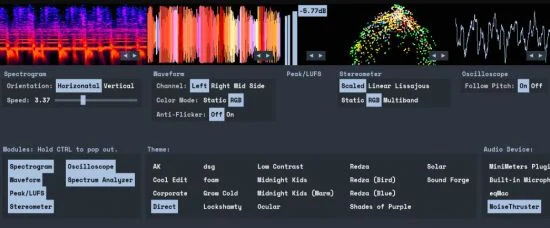
自主选择功能模块
选择你喜爱的颜色
或创建专属主题:
Linux 系统使用说明
更新日志(changelog)
MiniMeters is a simple standalone audio metering app for Windows, macOS, & Linux.
Monitor your System Audio*, Any Input, or insert the MiniMetersServer Plugin (VST3/AU/CLAP) at the end of your master channel in the DAW of your choice.
Customize the layout in a horizontal bar (perfect for above or below your audio tool of choice) or pop out modules to create a custom layout.
* Not supported on all systems. See the system audio capture support table below.
Choose your own Modules
Mix & Match modules to find the best layout for you.
Spectrogram
View the frequency history of your audio.
Stereometer
Check the stereo width and balance of your audio.
Waveform
See the waveform representation of your audio in realtime.
Peak / LUFS
See a simple view of your immediate peak value (left) & LUFS value (right).
Oscilloscope
See the most immediate wave representation of your audio in realtime.
Spectrum Analyzer
View the frequency content of your audio.
Choose Your Favorite Colors
MiniMeters includes a wide variety of themes.
…Or Make Your Own Theme:
Themes are fully editable and customizable. The included template is a great place to start.
LINUX INSTRUCTIONS
Download the .AppImage and double click.
Install the plugins to ~/.vst3 & ~/.clap respectively.
changelog