设计工具(Design Tools)
灯光控制(Lighting)
音频控制(Audio)
视频控制(Video)
演出控制(Show Control)
系统要求(Requirements)
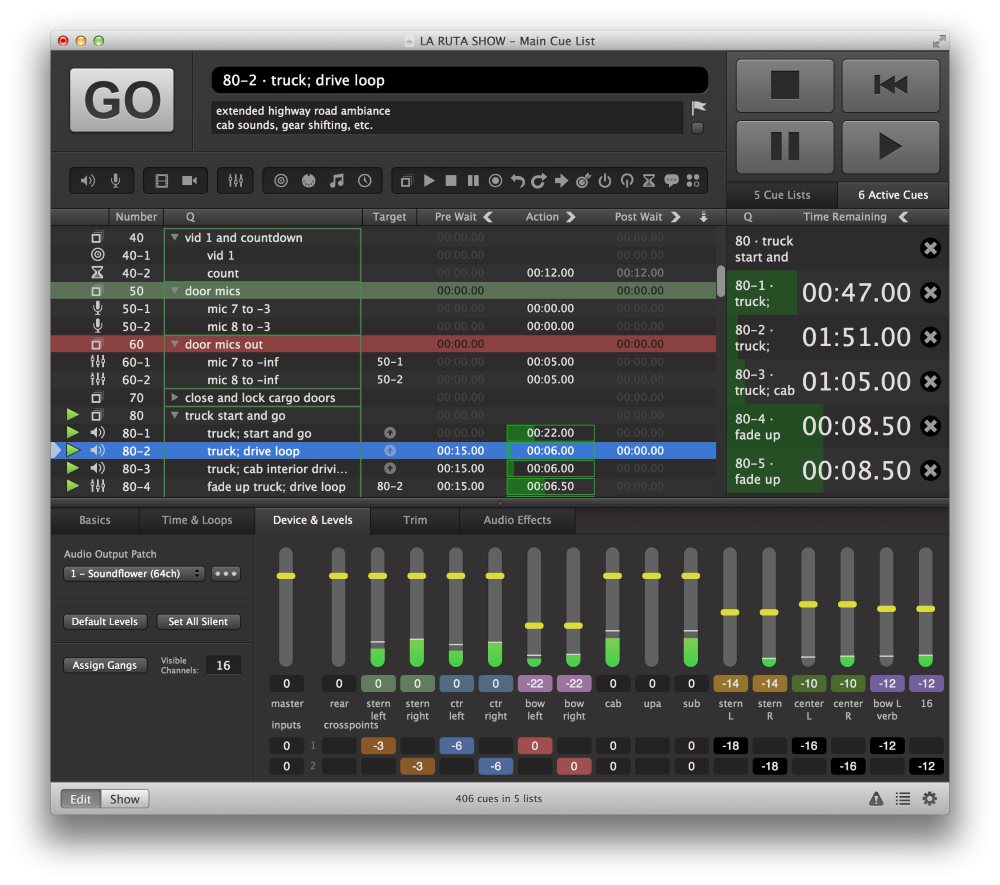
QLab provides live show control for your Mac. Create media designs for theatre, dance, composition, installation, and more. Play back audio, video, and MIDI from a single workspace. QLab 4 includes an all-new Light cue, a huge update to QLab Remote for iOS, and over 40 other new features.
Design Tools
– Unlimited Cue Lists with unlimited cues
– Unlimited Cue Carts with 1 to 64 buttons per cart
– Design in Edit Mode and run your performance in Show Mode
– Non-destructive design tools never modify your media files
– Undo any edits
– “Audition” cues locally without sending audio, video, or lighting output to the stage
– Cue templates and Workspace templates
– “Record cue sequence” tool, to capture timing and play it back again the same way later
– “Paste cue properties” tool, to selectively paste properties from one or more cues onto other cues in your workspace
– Text search of cue lists and cue carts
– Extensive AppleScript and OSC APIs
– A comprehensive Status Window to guide troubleshooting
– Powerful and painless remote editing via QLab Remote
Lighting
– Control unlimited Art-Net DMX universes.
– Create unlimited light instruments (like channels, but can be named anything, not just numbers).
– Create unlimited light groups to collect related instruments together, like “all”, “stage right”, “LEDs”, “floor”, or “floor front left”.
– Use both conventional dimmers and more complex lights with multiple parameters (includes support for percentage-based parameters, as well as both 8-bit and 16-bit direct DMX parameters.)
– QLab-style levels fading: it’s simple to build looks and effects that you can layer and reuse. A Light cue changes only the levels you set in the cue, and leaves the rest unchanged.
– Build sophisticated lighting designs by chaining Light cues together to build complex cue sequences out of simpler parts, then trigger the sequence with a single “GO” like a chain of dominoes.
– As with all cues in QLab, Light cues can be copied, pasted, reordered, paused, resumed, and stopped at any time
– All QLab fade curves are available for Light cues; including linear, s-curve, or totally custom shape fades.
– See and manipulate the current levels of all your lights using the Light Dashboard.
– If you need to sneak in live edits from the Dashboard, you can optionally tell QLab to apply the new values “over time” so they’ll fade in smoothly.
– Open the Audition Window to view the effects of light cues “blind” in the dashboard. Close the Audition Window, and the dashboard will instantly revert back to show the live state of your lights.
– Adjust your lights in the dashboard, then:
-Create a new cue with just the changes,
-Create a new cue with all instruments,
-Update the last-run light cue with the changes, or
– Trace back the edits to each cue that most recently modified each instrument.
– Map your favorite MIDI controller to light commands, for editing either the light dashboard or individual cues.
– For motorized MIDI hardware, QLab supports MIDI “feedback” from the light dashboard and individual light cues. (Aka “flying faders”.)
– Use QLab’s powerful light command language, with autocompletion, instrument or group parameter addressing, ranges, ad-hoc groups, and command history, to efficiently edit both the light dashboard and individual light cues.
– View light cues as sliders, tiles, or raw command text at any time.
– View the Light Dashboard as sliders or tiles.
– Edit lights via keyboard entry (on the command line) or with the mouse (via clicking and dragging.)
– Easily delete individual light commands from any cue, and of course undo any edits.
– In slider view, expand group commands into all the individual instruments currently in the group.
– In slider view, indicators show the current live value of each light in a cue.
– In slider view, select multiple commands to temporarily “gang” them, so you can adjust them up or down together.
– Quickly see when a group of instruments is set to all the same level or a mix of different levels.
– Batch-edit multiple light cues by selecting them and then simply editing any light command they all share. (Or adding a new command to all of them at once.)
– Use AppleScript, either externally or via Script cues, for advanced programming techniques like algorithmically generating a series of Light cues.
– Control both the Light Dashboard and individual Light cues via OSC messages.
Audio
– Support for up to 64 channels of audio output
– Support for up to 24-channel audio files
– Support for up to 24 channels of live audio input
– Audio waveform view
– Unlimited slices of your media files for looping and vamping
– Sample-accurate playback synchronization across multiple cues
– Audio panning and volume fading
– Customize output channel names
– Edit audio device routing
– Audio effects on any cue
– Audio effects on cue outputs
– Audio effects on device outputs
– Fade audio effects dynamically
Video
– Full-screen or custom geometry for Video cues
– Fade and animate videos
– 1000 layers of video
– Masking and edge-blending across multiple projectors
– Warping and keystone correction
– Basic video effects
– Live camera input with the Camera cue
– Syphon input & output
– Blackmagic input & output
– Text & titles with the Text cue
Show Control
– Send OSC or UDP messages using the Network cue
– Fade your OSC messages over time, in 1D or 2D
– Inject live values from your workspace into outgoing OSC messages
– Send all MIDI and MIDI Show Control messages with the MIDI cue
– Send MIDI messages by playing MIDI files with the MIDI File cue
– Run your own AppleScripts with the Script cue
– Generate LTC or MTC output with the Timecode cue
– Trigger cue lists from incoming LTC or MTC timecode
– Remote control via OSC and MIDI
Requirements: Intel, 64-bit processor OS X 10.10 or later
Home Page – https://figure53.com/qlab