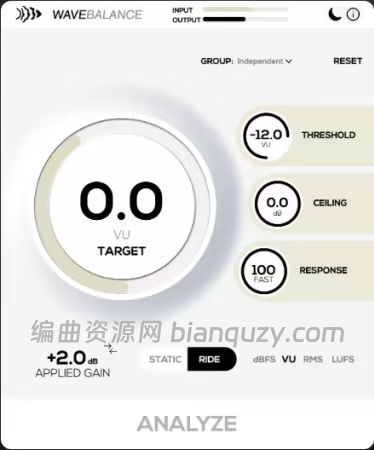
📦 42 MB | 语言:英文 | VST3/AU/AAX 增益编排插件
🎯 核心定位
“自动将音轨保持在一致的工作电平,让 EQ、饱和器和模拟建模插件的表现更加可预测。不用再反复修 clip gain 或和不稳定的录音较劲,WaveBalance 在后台透明地让你的会话保持平衡。”
WaveBalance 是一款实用型增益编排插件,适用于混音电平、人声、导入的 stem、采样包和大型工程。具备透明实时增益控制、Analyze & Hold 工作流、分组支持和内置动态余量保护。
✅ 核心功能
| 功能 | 说明 |
|---|---|
| 🎚️ 透明自动增益编排 | 缓慢、超平滑的增益控制,让电平稳定,听起来不会有压缩感或人为感 |
| 🔄 Ride 模式 | 实时持续管理工作电平,适用于人声、贝斯、现场录音和动态音源 |
| 📌 Analyze & Hold | 分析音轨 → 锁定修正值 → 以固定增益编排继续混音 |
| 📊 多模式响度检测 | 支持 dBFS / VU / RMS / LUFS-M / LUFS-S / LUFS-I,按需选择 |
| 🔗 分组(Grouping) | 多个 WaveBalance 实例链接到共享目标/组,统一控制 |
| 🛡️ 内置动态余量保护 | 集成前视砖墙安全限制器,防止增益修正后出现削波 |
| 🌙 暗色界面 | 深夜创作/混音/演出准备专用,切换主题不改变控制布局 |
💡 适用场景
| 场景 | 说明 |
|---|---|
| 🎛️ 让模拟建模插件工作在最佳区间 | 给压缩器、磁带插件、饱和器提供更一致的输入电平 |
| 🧹 快速清理混乱会话 | 导入的 stem、采样包、录音,几秒内拉平电平 |
| 🎤 压缩前稳定人声 | 减少下游处理前的电平不一致 |
| 📁 管理大型工程 | 用分组功能跨复杂会话统一管理工作电平 |
🎛️ 核心规格一览
| 规格 | 详情 |
|---|---|
| 增益模式 | Ride(实时)/ Analyze & Hold(锁定) |
| 响度检测 | dBFS / VU / RMS / LUFS-M / LUFS-S / LUFS-I |
| 分组 | 多实例共享目标,链接控制 |
| 余量保护 | 前视砖墙限制器,防削波 |
| 界面 | 亮色 / 暗色可切换 |
| 格式 | VST3 / AU / AAX |
| 平台 | macOS 10.13+(Apple Silicon & Intel)/ Windows 10(64位) |
| DAW 兼容 | Ableton Live, FL Studio, Logic Pro, Bitwig, Studio One 等多数 VST3/AU 宿主 |
| 要求 | 推荐 4 GB RAM,200 MB 磁盘空间,需联网激活 |
❓ 常见问题
| 问题 | 回答 |
|---|---|
| WaveBalance 是压缩器吗? | 不是。它专注于透明增益编排和工作电平管理,可以放在压缩链之前,平滑喂给动态处理器的信号 |
| 该用哪种表头模式? | 音乐电平匹配用 VU 或 RMS;响度导向工作用 LUFS-M/S/I;峰值余量为主用 dBFS |
| 能控制混音电平吗? | 可以。人声、stem、乐器、总线都能在进入后续链路前拉到一致工作电平 |
| 什么是自动增益编排插件? | 分析输入信号电平,施加平滑增益修正,让下游插件反应更一致,无需反复手动修 clip gain |
💻 系统要求
| 平台 | 要求 |
|---|---|
| macOS | macOS 10.13+(Apple Silicon & Intel) |
| Windows | Windows 10(64位) |
| 格式 | VST3 / AU / AAX |
| DAW | Ableton Live, FL Studio, Logic Pro, Bitwig, Studio One 等多数 VST3/AU 宿主 |
| 要求 | 4 GB RAM 推荐,200 MB 磁盘空间,需联网激活 |
🏠 官网
🔗 https://codwaves.com/wavebalance/
✅ 一句话总结:WaveBalance = 混音电平的「自动稳定器」,透明实时增益控制 + Analyze & Hold + 分组管理 + 余量保护,让所有下游插件都在一致电平下工作,告别反复修 clip gain 的痛苦。 🎚️🔥
File size: 42 MB
Keep tracks at a consistent operating level automatically so EQs, saturators, and analog-modelled plugins behave more predictably. Instead of constantly trimming clip gain or fighting inconsistent recordings, WaveBalance keeps your session balanced transparently in the background.
A practical gain staging plugin for mix levels, vocals, imported stems, sample packs, and large sessions, with transparent real-time gain control, Analyze & Hold workflow, grouping support, and built-in headroom protection.
Auto gain staging in motion
See the basic WaveBalance behavior: uneven input level is analyzed, corrected toward a stable target, and kept under control before it reaches the next plugin in your chain.
Keep your mix operating at the right level
WaveBalance automatically manages track gain so your plugins receive a more stable and predictable input level. Instead of constantly trimming clip gain or fighting inconsistent recordings, WaveBalance keeps your session balanced transparently in the background.
From vocals and live instruments to imported stems and sample packs, it helps compressors, EQs, tape plugins, and saturators behave more consistently across your entire mix. It removes the friction from gain staging while keeping mix levels predictable.
Whats New
Updates: official site does not provide any info about changes in this version
System Requirements: Windows 10 (64-bit)
![创意混音和母带处理可视化工具合集 Orra Audio Plugins Bundle 2026.10 [WiN]](http://www.bianquzy.com/wp-content/uploads/2026/10/Orra-Audio-45ce505d.png)


![声音塑形与过载压缩效果器插件 Stereo Lemon PHAT v1.7.3 [WiN]](http://www.bianquzy.com/wp-content/uploads/2026/10/Stereo-Lemon-PHAT-v1.7.3-声音塑形与过载压缩效果器插件-WiN.jpg)
