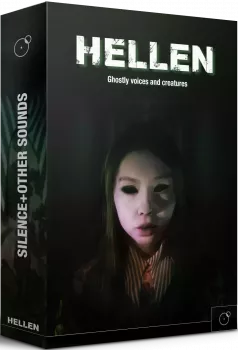
WAV KONTAKT | 1.54 GB
《赫伦》内含清单
乐器预设详情
01:人声质感(Vocal Textures)
02-08:单发音效(One Shot SFX)
09-10:音节 / 呼吸序列(Syllables / Breath Sequences)
11:人声演绎构建器(Vocalise Builder)
12:呼吸循环(Breathing Loops)
在 Kontakt 中打开《赫伦》
Kontakt 6 用户:
Kontakt 7 用户:
Hellen is a Kontakt library based on ghostly voices and creatures sounds. S+OS have teamed up with vocalist Alessandra Cognetta a.k.a. Psamathes to record a variety of vocal styles: operatic/soprano (multisampled), screams, whispers, growls, gasps, yells plus several tonal and atonal vocal layers and a variety of found sounds ranging from animal recordings to metallic friction and bowed effects.
Most of them have been processed with advanced sound design techniques (spectral morph in Kyma, formant and vowel processing etc.) to create a huge variety of sounds: soprano textures and layers, demoniac screams, evocative laments and howling sounds, unsettling laughs, designed creatures effects, ethereal whisperings , elusive broken sentences, monster growls and vocalizations, hair-raising screeches and shrieks, breathing loops (tempo synched) and even syllables and phrases in a fictional language inspired to ancient Latin.
All the 12 instruments in Hellen (playable and sound design) fit particularly well the horror and thriller realm; they have been conceived and developed to cover the needs of the modern composer and ambient producer, from the vocal textures evoking scenes of haunted settings, to terrifying vocal stabs to create effective jump scares and impactful vocal effects.
Whats inside Hellen
12 PLAYABLE KONTAKT INSTRUMENTS
– Playable Vocal Textures instrument based on two independent layers
– 7 One Shot SFX instruments, divided by category of sounds: Screams, Laments-Howlings, Creatures, Whispers-Sentences, Monster Growls, Shrieks-Screeches, Gasps-Yells.
– 2 vocal sequencers/builders, allowing you to sequence short groups of tempo synched syllables
– Vocalise Builder used to easily create customized demonic and creature-esque voices.
– Breath Loops instrument featuring tempo synched loops (it is possible to alter the timing and the gender of the voice and creating tensive vocal rhythms.)
– High Resolution Audio samples (48kHz)
– 56 Snapshots
– 400+ SFX (96 kHz 24 bit)
– Total wav files: 569
The Instruments
01: Vocal Textures
Vocal Textures is a playable instrument based on two independent layers (L1 and
L2) of vocal tonal and atonal sounds that can be blended, filtered and
morphed from the intuitive main panel in the UI. Each layer features cutoff, resonance, LFO and Volume Envelope controls. With the useful VOCAL MORPH knob it is possible to easily create interesting sonic combinations from any chosen pair of sounds. Vocal Textures feature 56 Kontakt snapshots.
02 to 08 – One Shot SFX
Hellen features 7 One Shot SFX instruments, divided by category of sounds:
Screams, Laments-Howlings, Creatures, Whispers-Sentences, MonsterGrowls, Shrieks-Screeches, Gasps-Yells.
The One Shot SFX instruments in Hellen feature a per-sample control on any parameter (Volume, Pitch, Low Pass Filter, High Pass Filter, LFO and Volume Envelope, Straight/Reverse play), plus the possibility to globally control any parameter by using the ‘Global Controls’ window. By using the Extend switch, you can play any chosen sample chromatically along the keyboard.
09 to 10 – Syllables / Breath Sequences
Hellen features two vocal sequencers/builders: the Syllables Sequencer and the Breath Sequencer. They both allow to sequence short groups of tempo synched syllables and create a long, rhythmical spoken phrase and/or breathing sequence.
The Syllables Sequencer is based on a fictional language occasionally resembling ancient Latin, whereas the Breath Sequencers features short breathing sounds. In both instruments, the two featured voices can be independently activated/deactivated per step. All the syllables have been recorded at 70 bpm and use the Time Machine Pro in Kontakt (HQ), so the quality of the sound is not compromised by bpm changes.
11 – Vocalise Builder
The Vocalise Builder in Hellen is a sound design instrument conceived and
developed to easily create customized demonic and creature-esque voices.
It is based on 3 independent layers featuring dry and less designed sounds in in
order to provide useful source material and allow room for creative experimentation.
The 3 layers can be automatically stacked on the top of each other by simply
pressing the green key on the virtual keyboard. Each layer can be played either with a regular sample playback or in Time Stretch mode, with control on the amount of time stretch and formants. By using the several randomization options, it is possible to quickly create interesting combinations of sounds and customized sound effects.
12 – Breathing Loops
The Breath Loops instrument in Hellen features tempo synched loops (original
tempo 70 bpm) automatically synched to the master tempo in the DAW. By using the Half Tempo and Formant controls (independent per each sample) it is possible to alter the timing and the gender of the voice and creating tensive vocal rhythms.
Opening Hellen in Kontakt
Kontakt 6 users:
– Open the Kontakt Browser and click the Files tab
– Navigate to the section of your HD where the main Hellen folder is stored.
– Open the ‘Kontakt instruments’ folder in it
– Double click on one of the 12 nki instruments.
Kontakt 7 users:
Kontakt 7 users have two options to open Hellen.
Option 1: the same as described in Kontakt 6 (see above)
Option 2: In Kontakt 7 you can import a non-Player library like Hellen and make it show up in the new Kontakt 7 main browser (only the .nki files, NOT the snapshots)
– Open Kontakt 7
– Click on the bottom-left cogwheel
– In the Import Content screen that shows-up, click on ‘Add’
– Navigate to the main Hellen folder on your HD select it and click ‘Open’
– Now Hellen shows up in the Kontakt Browser, you can open the .nki instruments from there.
![[维也纳童声合唱团] Vienna Symphonic Library Synchron Vienna Boys Choir Full (VSL Synchron Player)(5.75GB)](http://www.bianquzy.com/wp-content/uploads/2026/03/Vienna-Symphonic-Library-Synchron-Vienna-Boys-Choir.webp)
![令人毛骨悚然的顶级影视恐怖人声合集 SampleTraxx Vocal Shock [WAV, KONTAKT]](http://www.bianquzy.com/wp-content/uploads/2025/12/SampleTraxx-Vocal-Shock-WAV-KONTAKT.jpg)
![Native Instruments Vocal Colors v1.5.2 [KONTAKT]](http://www.bianquzy.com/wp-content/uploads/2025/12/Native-Instruments-Vocal-Colors-v1.5.2-KONTAKT.jpg)
![黑暗合唱团 VSTBuzz Vox Arcanum [KONTAKT]](http://www.bianquzy.com/wp-content/uploads/2025/11/VSTBuzz-Vox-Arcanum-KONTAKT.jpg)
