不管是行业专家,还是缺乏经验的新手,都可以轻松使用这款软件。Entonal Studio使演奏和排序调音越来越简单。该插件允许你在多个轨道上编辑调音,使用 MTS-ESP 或 MIDI 弯音轮的信息来重新调整硬件和软件合成器。此外,它还与 MPE 兼容,从而使演奏更具表现力。
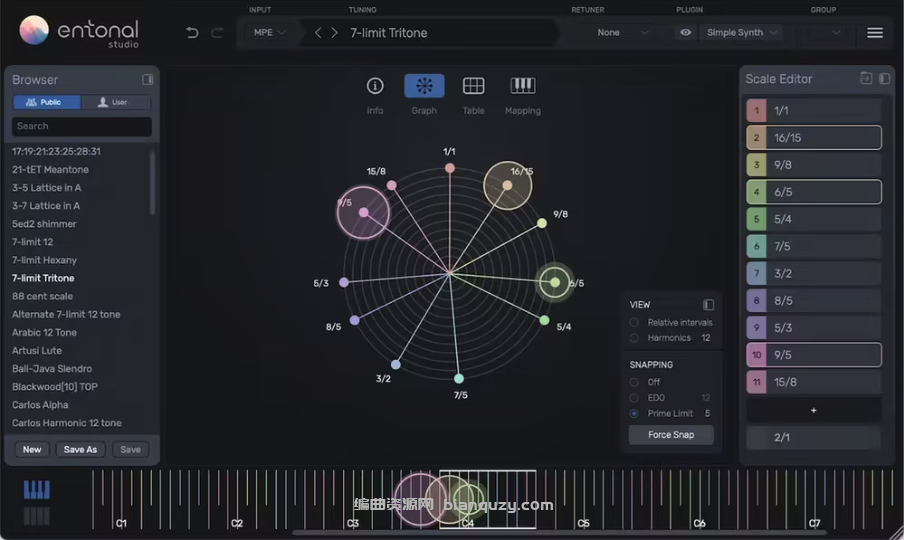
Entonal Studio 通过软件界面中的径向图对音符的音高进行控制。你可以查看许多音符之间的相对间隔,也可以检查和声排列。更重要的是,单个音符也可以通过两种方式进行修改,要么卡入特定的比例,要么以音分、EDO度或数学表达式的形式手动拖动音符。
灵活的键盘映射选项具有标准配置,Entonal Studio 还支持超过 100 种预设调音,包括传统调式 Just Intonation和 19 音的 Equal Temperament 等,以及更小众的律制 Harry Partch 的 43 音阶。此外,音阶编辑器可以添加和删除音符。
File size: 10.8 MB
径向图谱(The Radial Graph)
插件宿主功能(Plugin Hosting)
预设浏览器(Preset Browser)
音阶编辑器(Scale Editor)
键位映射(Key Mapping)
调律网格(Tuning Lattice)
音阶生成器(Scale Generator)
分组功能(Grouping)
内置合成器(Onboard Synth)
Entonal Studio is a microtonal plugin and standalone app which enables users to retune any VST or AU virtual instrument. Tuning individual notes in your DAW and beyond is now simple and intuitive thanks to Entonal Studio’s radial graph and flexible keyboard mapping options. What’s more, Entonal Studio can act as both a MIDI plugin and a host for VST/AU instruments, meaning no MIDI routing is needed to turn your favourite plugins into fully microtonal instruments.
The Radial Graph
Easily retune scale notes by colour and angular position, drag notes freehand in cents or have them snap to EDO degrees or simple ratios within a given prime limit. You can also view the relative intervals between two or more held notes, and check harmonic alignment with the ‘harmonics view’.
Plugin Hosting
One cause of friction in the microtonal music workflow is the MIDI routing required behind the scenes. Entonal Studio can work this way, but it can also host VST2, VST3 and AU instruments, making your favourite synths and other instruments microtonal in just a couple of clicks.
Preset Browser
Discover a plethora of non-standard tunings with Entonal Studio’s browser. From common tunings and useful starting points – just intonation, 19-tone equal temperament – through to more esoteric selections – 43-tone Harry Partch and 7-limit Hexany.
Scale Editor
Add or remove new notes in a list, and type their values in cents, ratios, EDO degrees or mathematical expressions. Define the ratio of the ‘repeating interval’ for scales that don’t repeat at the octave (2/1).
Key Mapping
Define how your custom scale is controlled by your keyboard controller or your DAW’s piano roll. Choose the root note and its frequency, define the number of notes in the scale, exclude black notes… or just use the default ‘Auto’ mode.
Tuning Lattice
Visualise the harmonic relationship between intervals in your scale. Each harmonic has it’s own dimension. Quickly see where certain chords or intervals exist in your scale.
Scale Generator
Import new tunings from Scala files, or whip up a new equal temperament by selecting the size of the octave and the number of its divisions.
Grouping
When using multiple instances of Entonal Studio in a DAW project, you can group instances together to follow each other. For example, tweak notes for your chord part, and your melody’s scale will follow.
Onboard Synth
Hear your tunings without connecting a thing behind the scenes. The built-in Simple Synth features anti-aliased oscillators, a snappy envelope and a tape-style delay unit.