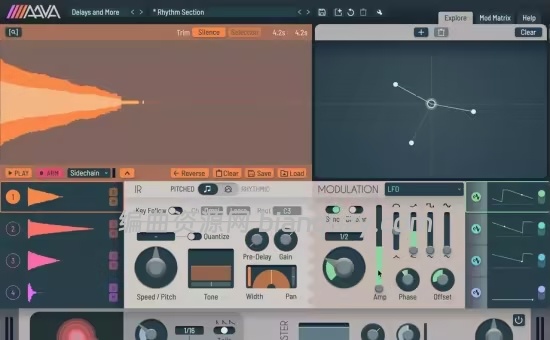
📦 46.6 MB | 语言:英文 | Windows 10+ | CLAP / VST3
🔥 核心定位
Aava 是一款突破性的卷积插件,允许你实时调整所有 IR(脉冲响应)参数,甚至可在音频速率下进行。
🎛️ 核心功能一览
| 功能 | 说明 |
|---|---|
| 📦 最多 4 层 IR 叠加 | Layer up to four IRs |
| 🥁 节拍同步 | Tempo sync rhythmic IRs |
| 🎹 音高跟随 | Key track pitched IRs |
| 🎙️ 实时录制 IR | Record IRs in real time |
| 📊 频谱压缩器 | Spectral compressor |
| 🔄 全局调制 | Modulate everything |
| 🎨 100+ 创意预设 | 100+ creative presets |
🔊 IR 模式
| 模式 | 说明 |
|---|---|
| 🎵 Pitched 模式 | 适用于音调型 IR(如 drone),自动音高检测精准跟随调性,IR 音高参数可量化为半音 |
| 🔄 LFO 调制器 | 支持 LFO 调制 |
🎚️ 调制器(Modulators)
| 调制器 | 说明 |
|---|---|
| 🔄 可变形 LFO | 拥有真正独特的波形,可变形 |
| 🥁 Tempo-sync Sample & Hold | 节奏同步采样保持 |
| 📈 AD / AR 包络 | 可由音频或 MIDI 触发 |
| 📊 可调包络跟随器 | Tweakable envelope follower |
| 🎹 音高跟随器 | Key follower |
| 🔄 全参数可调 | 所有参数本身也可被调制——当你的 LFO 真的需要一个 LFO 时 😉 |
🎛️ IR 编辑器
| 功能 | 说明 |
|---|---|
| ✂️ 可视化编辑 | 在可视化 IR 编辑器中裁剪和添加淡入淡出,支持缩放以进行精细调整 |
| 🎙️ 录制 IR | 支持加载或录制最长 600 秒的脉冲响应 |
| 📥 录制来源 | 可从输入、侧链或输出录制 IR |
| 🔄 边录边用 | 录制过程中可同时使用 IR,进行疯狂的声音设计实验 |
🗺️ 探索地图(Explore Map)
| 功能 | 说明 |
|---|---|
| 📍 节点保存 | 将插件状态保存为地图上的节点 |
| 🖱️ 光标漫游 | 移动光标即可在节点间融合切换 |
| 🎛️ XY 控制器 | 可用作 XY 控制器,淡入淡出 IR 的不同部分 |
| 🧭 自由探索 | 随意探索,看它能带你去哪里 |
💻 系统要求
| 项目 | 要求 |
|---|---|
| 🪟 Windows | 10 及以上 |
| 💾 内存 | 8GB RAM |
| 💿 磁盘空间 | 210MB |
| 🔌 插件格式 | CLAP 或 VST3(64位主机) |
✅ 一句话总结:Aava = 突破性卷积插件,所有 IR 参数可实时调整(甚至音频速率),4层 IR 叠加 + 音高/节拍跟随 + 实时录制 IR + 全局调制 + 可视化 IR 编辑器 + 探索地图,100+ 预设,适合需要深度卷积处理的声音设计师。 🎛️🔥🎙️
File size: 46.6 MB
Aava is a groundbreaking convolution plugin that allows you to adjust all IR parameters in real-time, even at audio rates.
* Layer up to four IRs
* Tempo sync rhythmic IRs
* Key track pitched IRs
* Record IRs in real time
* Spectral compressor
* Modulate everything
* 100+ creative presets
* And more!
Features
IR Modes
Use Pitched mode for tonal impulse responses such as drones. You get automatic pitch detection for accurate key following and the IR Pitch parameter can be quantized to semitones.
LFO modulator
Modulators
Morphable LFO with some truly unique wave shapes. Tempo-syncable sample & hold. AD and AR envelopes triggerable either by audio or MIDI. Tweakable envelope follower. And finally, a key follower. All the parameters can themselves be modulated. For those times when your LFO absolutely needs an LFO.
IR Editor
Trim and add fades with the visual IR editor while zooming in for detailed adjustments. Load or record impulse responses up to 600 seconds in length. IRs can be recorded from the input, sidechain or output and you can even use an IR while recording continuously for some truly wild sound design experiments.
Explore Map
Save plugin states on the map as nodes, then move the cursor around to morph between them. You can use this like an XY controller, for fading IR parts in or out, or just do some exploration and see where it takes you.
System Requirements
Windows 10 or newer
8GB RAM
210MB disk space
64-bit host supporting CLAP or VST 3
![创意混音和母带处理可视化工具合集 Orra Audio Plugins Bundle 2026.10 [WiN]](http://www.bianquzy.com/wp-content/uploads/2026/10/Orra-Audio-45ce505d.png)

![声音塑形与过载压缩效果器插件 Stereo Lemon PHAT v1.7.3 [WiN]](http://www.bianquzy.com/wp-content/uploads/2026/10/Stereo-Lemon-PHAT-v1.7.3-声音塑形与过载压缩效果器插件-WiN.jpg)
