File Size: 9.2 MB
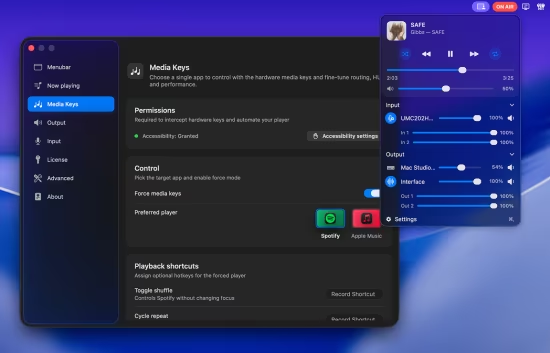
BetterAudio是一款适用于macOS的菜单栏应用程序,用于高级音频设备管理。它允许您快速切换输入/输出设备、控制音量、查看当前正在播放的内容,并可通过易于配置的全局键盘快捷键进行操作。
功能介绍
快速切换输入和输出设备
显示所有可用设备,并可隐藏/拉黑您不使用的设备
直接从菜单栏控制系统音量
更改音量或切换设备时,在屏幕上显示平视显示器(HUD)/通知
使用键盘快捷键+一键通功能使麦克风静音
显示“正在播放”部分
为音量调节和设备切换配置全局键盘快捷键
BetterAudio is a macOS menu bar app for advanced audio device management. It lets you quickly switch input/output devices, control volume, see what’s currently playing, with easily configurable global keyboard shortcuts.
What it does
Quickly switch between input and output devices
Show all available devices, with the ability to hide/blacklist the ones you don’t use
Control system volume directly from the menu bar
Show on-screen HUD / notifications when you change volume or switch devices
Mute the microphone using a keyboard shortcut + push-to-talk
Display a Now Playing section
Configure global keyboard shortcuts for volume and switching devices