File Size: 4.3 MB
Transcribe! 软件介绍
一、伴奏跟练用途
二、语音文稿转写用途
三、对比普通播放器的优势
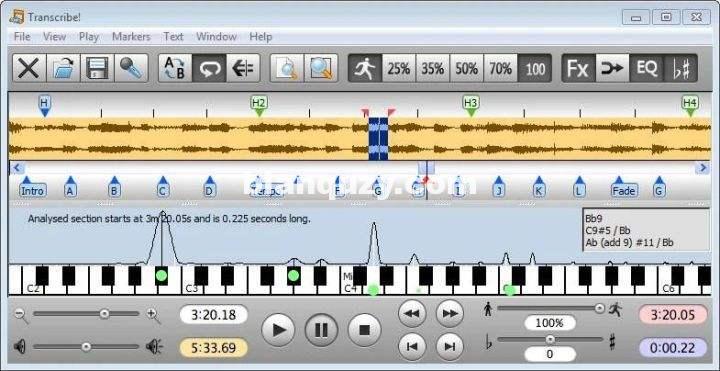
你只需将音频录音保存至电脑硬盘,即可使用 Transcribe! 开展扒谱。软件内置多项功能简化扒谱流程:
- 变速不变调,放慢乐曲同时保留原音高;
- 和弦频谱分析,直观显示音频内包含的音符;
- 支持添加标记点与文字批注,快速定位乐曲段落;
- 屏幕内置虚拟钢琴键盘,点击即可播放参考音。
重要说明
频谱分析功能对分辨模糊难辨的和弦十分实用,但仍需要依靠你的听觉与乐理判断:频谱里的峰值哪些是实际演奏音符、哪些只是泛音、哪些是底鼓等宽频乐器产生的噪音。
如果你完全没有靠耳朵扒过简单乐曲,这款软件很难起到帮助(可查阅《扒谱入门教程》);但如果你平时习惯耳听扒曲,Transcribe! 能大幅降低你的扒谱难度、节省大量时间。
The Transcribe! application is an assistant for people who want to work out a piece of music from a recording, in order to write it out, or play it themselves, or both. It doesn’t do the transcribing for you, but it is essentially a specialised player program which is optimised for the purpose of transcription. It has many transcription-specific features not found on conventional music players.
It is also used by many people for play-along practice. It can change pitch and speed instantly, and you can store and recall any number of named loops. So you can practice in all keys, and you can speed up as well as slow down. There is some advice about play-along practice in Transcribe!’s help, under the heading “Various Topics”.
And it is also used for speech transcription. With its support for foot pedals and its superior slowed-down sound quality, it is an excellent choice for this purpose. There is some advice about speech transcription in Transcribe!’s help, under the heading “Various Topics”.
Conventional music players (whether hardware such as a CD player or an iPod, or software such as Windows Media Player or iTunes) are really designed for people who want to listen to whole tracks. They are very inconvenient for transcribing music as they are not designed for this purpose. If you copy the recording to your computer’s hard disk as a sound file then you can use Transcribe! instead. Transcribe! offers many features aimed at making the transcription job smoother and easier, including the ability to slow down music without changing its pitch, to analyse chords and show you what notes are present, and the capability of adding markers and textual annotations so you can easily navigate around the track. Transcribe! also has a piano keyboard displayed on screen which you can click to play reference notes.
It is important to understand that Transcribe! does not attempt to do the whole job, processing an audio file and outputting musical notation or midi – this would be nice, but is a currently unsolved research problem. The spectrum analysis feature is very useful for working out those hard-to-hear chords, but you must still use your ear and brain to decide which of the peaks in the spectrum are notes being played, which are merely harmonics, and which are just the result of noise and broad-spectrum instruments such as drums. If you have never worked out even a simple piece of music by ear then Transcribe! will probably not help you (see How to Transcribe), but if you do sometimes work out recorded music by ear then Transcribe! can make the job a lot quicker and easier.