File size: 1.15 GB
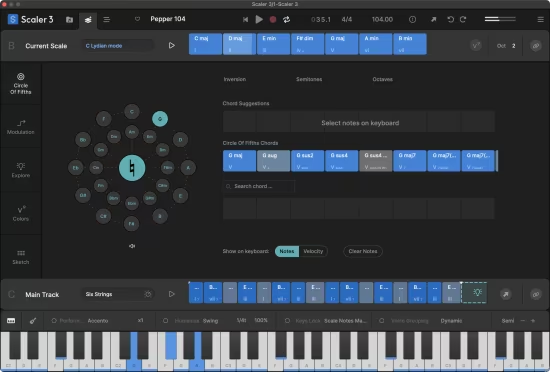
一次彻底的重新设计,Scaler 3 汲取了让 Scaler 2 成为全球最受欢迎音乐理论插件的一切特质,并以你从未想象过的方式进行了扩展。Scaler 3 将让你更容易地探索新方向,解决音乐谜题,并以全新的方式改进你正在进行的作品。
备受期待的、屡获殊荣的 Scaler 2 的继任者终于来了!
→ 浏览、创建、编排。
- 重新设计的 UX/UI:Scaler 3 经过了全面重新设计,既让 Scaler 2 用户感到熟悉,又为新用户提供了精简的体验。界面被组织成三个主要页面:浏览(Browse)、创建(Create)和编排(Arrange)。
- 独立应用程序:Scaler 3 现在除了可以作为任何 DAW 中的插件运行外,还可以作为独立应用程序运行,提供完整且灵活的歌曲创作工具。
- 多轨道时间线:“编排”页面现在包含基于时间线的布局,并为和弦、旋律、贝斯和乐句提供了专用轨道。每个轨道都与主和弦轨道同步,且片段可通过每个轨道或片段的独立控制进行完全调整。
- 探索页面:发现一个不受任何特定音阶束缚的和声宇宙。探索页面按流派和感觉(例如,黑暗、明亮、中性)进行分类,建议兼容的和实验性的和弦进行,为独特而大胆的和声结构解锁新路径。
- 色彩页面:在一个统一的页面上探索所有和弦转位和和声替代方案的全面视图。即时访问平行和弦和关系和弦,以及多样化的转位和替换选项,为你的作曲增添表现力和创意灵活性。
- 动态(Motions):Scaler 备受喜爱的乐句(Phrases)、演奏(Performances)、旋律(Melodies)和贝斯线(Basslines)被重新构想为动态(Motions),现在带有基于情绪的标签,以便于浏览。Scaler 3 引入了由专业音乐家打造的数百种新动态,包括全新的段落动态(Passages Motion)。
- 音符编辑与和声修饰器:一个全面的音符编辑矩阵允许用户自定义或创建新的动态。MIDI 轨道可以设置为跟随和弦轨道或独立运行,并使用新的和声修饰器和动态控制来调整音符范围、密度、音高和片段旋转——所有这些都在选定的音阶内进行。
- 扩展内容:Scaler 3 提供了显著的内容扩展,包括新的和弦组、和声宇宙、动态和音阶,由 samplify studio 和顶级艺术家网络贡献。
- 增强的分类:改进的过滤和搜索功能可以在 Scaler 3 的内容中快速导航。可按情绪、能量、音符数量、音阶等进行搜索。
→ Scaler 3 完整功能列表
✓ 数百个按情绪、艺术家和流派分类的和弦组和音阶。Scaler 3 极大地扩展了和弦组的数量,并使其更易于使用。
✓ 使用音序器构建和弦进行,并根据当前选定的和弦获得建议。
✓ 通过 VST/AU 插件托管来演奏你喜爱的乐器,也包括效果器。
✓ 凭借强大的 MIDI 和音频检测功能,Scaler 可以确定你所处的调性和音阶,并建议与你的音乐相匹配的和弦。
✓ 独立模式,无需 DAW 即可在桌面计算机上工作。
✓ 庞大的动态库让你可以将和弦演奏为旋律、琶音、贝斯线和扫弦,并使用钢琴卷帘编辑器和全局音符属性对其进行修改。
✓ 查看五度圈以找到邻近的和弦替换及其延伸音。
✓ 用五种方式解决转调难题:进行式(Progression)、次级音阶(Secondary Scale)、调式互换(Modal Interchange)、中音(Mediants)、新里曼理论(Neo-Riemannian)。
✓ 尝试声部分组(Voice Grouping)以保持和弦在特定音域内,或应用降音转位、吉他转位等。
✓ 50 种内置音色用于演奏你的输入、和弦和进行,或加载 VST/AU 乐器插件。
✓ 使用键盘绑定(Bind to Keyboard)功能,用音符控制和弦播放,实现单指和弦、琶音等。
✓ 在色彩页面中探索新的和弦表达方式——和弦替换、转位、变体、转位和延伸音。
✓ 在速写板(Sketch Pad)页面中排列七个具有不同动态的进行以进行比较。
支持的操作系统
- macOS 10.14 或更高版本
- Apple Silicon 或 Intel Core 处理器
官网
https://scalermusic.com/products/scaler-3/
A complete redesign, Scaler 3 takes everything that made Scaler 2 the world’s favourite music theory plugin and builds on it in ways you’d never imagined. Scaler 3 will make it easier to take new directions, solve musical puzzles, and improve your works-in-progress in completely new ways.
The long-awaited successor to the multi-award-winning Scaler 2 is finaly here!
→ Browse, Create, Arrange.
•Redesigned UX/UI Scaler 3 has been fully redesigned to remain instantly familiar to Scaler 2 users, while providing a streamlined experience for newcomers. The interface is organized into three main pages: Browse, Create, and Arrange.
•Standalone App Scaler 3 can now run as a standalone app in addition to a plugin within any DAW, offering a complete and flexible songwriting tool.
•Multi-Lane Timeline The Arrange page now includes a timeline-based layout with dedicated lanes for chords, melody, bass, and phrases. Each lane is synchronized with the main chord track, and clips are fully adjustable with independent control per lane or clip.
•Explore Page Discover a Harmonic Universe of chords untied to any specific scale. Categorized by genre and feel (e.g., Dark, Bright, Neutral), the Explore Page suggests compatible and experimental chord progressions, unlocking new paths for unique and bold harmonic structures.
•Colors Page Explore a comprehensive view of all chord voicings and harmonic alternatives in a single, unified page. Instantly access parallel and relative chords, as well as diverse voicing and substitution options, to add expressivity and creative flexibility to your compositions.
•Motions Scaler’s beloved Phrases, Performances, Melodies, and Basslines are reimagined as Motions, now with mood-based tags for easier browsing. Scaler 3 introduces hundreds of new Motions crafted by professional musicians, including the all- new Passages Motion.
•Note Editing & Harmonic Modifiers A comprehensive note editing matrix allows users to customize or create new Motions. MIDI lanes can be set to follow or run independently of Chord Tracks, with new Harmonic Modifiers and Motion Controls to adjust note range, density, pitch, and clip rotation – all within the chosen scale.
•Expanded Content Scaler 3 offers a significant content expansion, including new Chord Sets, Harmonic Universes, Motions, and Scales, contributed by samplify studio and a network of top-tier artists.
•Enhanced Categorization Improved filtering and search functionality enable quick navigation across Scaler 3’s content. Search by mood, energy, note count, scale, and more.
→ Scaler 3 Full Feature List
✓100s of Chord Sets and Scales categorised by mood, artist and genre. Scaler 3 greatly expands the number of chord sets and makes them easier to work with.
✓Build Chord Progressions using the sequencer and get suggestions based on your currently selected chords.
✓ Play your favourite instruments withVST/AU Plugin Hosting, including effects too.
✓ With powerfulDetection of MIDI and audio, Scaler can determine what key and scale you’re in and suggest chords that match your music.
✓Standalone mode for working on your desktop computer without needing a DAW.
✓ Huge library of Motions lets youplay chords as melodies, arpeggios, basslines and strums, and to modify them using the piano roll editor and global Note Properties..
✓ Check theCircle of Fifths to find nearby chord substitutions and their extensions.
✓Solve your modulation puzzles in five ways: Progression, Secondary Scale, Modal Interchange, Mediants, Neo-Riemannian.
✓ Experiment withVoice Grouping to keep your chords within a certain range or apply drop voicings, guitar voicing and more.
✓50 Internal Sounds to play your inputs, chords and progressions, or load VST/AU instrument plugins.
✓ UseBind to Keyboard to control chord playback with notes, for one-finger chords, arpeggios and more.
✓Discover new chord expressions – chord substitutions, inversions, variations, voicings and extensions – in the Colors page.
✓ Line up seven progressions with different motions to compare in theSketch Pad page.
Supported Operation System
• macOS 10.14 or later
• Apple Silicon or Intel Core processor